Introduction of image extensions in Google Ads
 Carel Schrier
Stand out more in Google Ads with the new image extensions. Google has released a new type of extension: image extensions. With image extensions in Google Ads, you can add various images to complement your existing text ads.

Grab attention on Google with striking, relevant imagery and drive more visitors to your website. Compelling, relevant images help you stand out from competitors and get noticed in the search results.
It is important to know that this is currently a beta feature, so it may not yet be available for all Google Ads accounts.
How do image extensions work?
When you set up image extensions in Google Ads, this complements your normal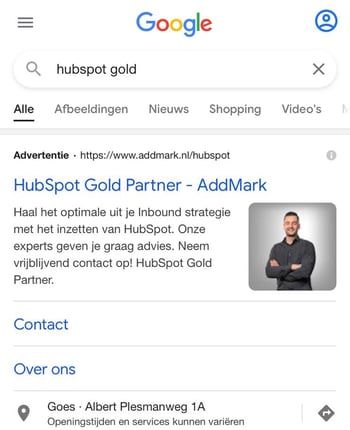 text ad. For this reason, it remains important to set up your ads properly and to keep optimising them.
Someone entering a search query on Google will then see the following:
- The headlines
- The description
- The URL
- The image
What should you pay attention to when setting this up?
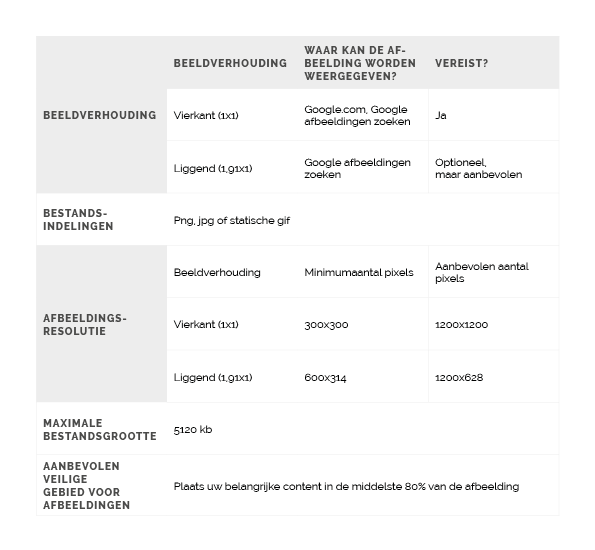
Image extensions in Google Ads come with a few requirements and guidelines you need to follow. You can upload a maximum of 20 images, and these must be of high quality.
It is also important to use image extensions that are relevant to your keywords. Google does this so that you cannot just upload any image; it also has to genuinely fit your account and website. Images may not contain text or logos, so keep this in mind when you start using image extensions.
Furthermore, the image must meet various specifications, and Google reviews the images thoroughly. It can take 5 working days before everything is approved, so it is good to factor this into your planning.
How are the costs charged?
The costs for image extensions are charged on a cost-per-click (CPC) basis. This is comparable to the CPC that is also commonly used for text ads. So you only pay for the image extension when someone actually clicks on it. These costs are roughly in line with the costs you are used to for a text ad.
Tips & tricks for effective image extensions
Setting up the right image extensions still takes quite some time and is a process of testing which image extensions work best for your business. We are happy to share a few tips to help you get started with image extensions.
Make sure the image extension matches your account structure
Image extensions can be set up at different levels. You can choose to set this up at account level, but also at campaign level. What works best differs per account. Is your account set up generically? Then we would advise setting up the image extension at account level. Do you have several specific campaigns? Then go for the extension at campaign level.
Make sure the images have the right dimensions
The images can be uploaded in different dimensions. This can be either a square or a landscape image. We advise uploading both and having Google Ads test which one works best. This can be done through experiments.
Use three images per extension
Ads, and now image extensions too, always perform best when three different options are used. So make sure you work with three different images per extension. This allows for proper testing, so the performance of the different images can genuinely be weighed against each other.
Keep testing and optimising
In Google Ads, it is important to always keep testing different ads and keep optimising where needed. The same goes for image extensions. Work with different variants or set up an experiment to test different versions. Given the pace of change in the online world, it is important to always keep testing. This gives you insight into what is relevant to your potential website visitor, so you can respond to it more effectively.
Would you like more information about image extensions in Google Ads? Then contact us.