INBOUND 2024 Blog
 Carel Schrier
What is INBOUND 2024
INBOUND24 is HubSpot's flagship event where professionals from marketing, sales and HR come together to discover the latest trends and technologies. This year is all about innovation, with a strong focus on AI, automation and data-driven strategies. With inspiring speakers, interactive workshops and countless networking opportunities, INBOUND24 gives attendees the chance to sharpen their skills and explore new business opportunities. Whether you attend in person or join virtually, INBOUND24 is the place to prepare for the future of marketing and sales.
Meet Breeze
An AI that powers the entire Customer Platform? Meet Breeze! This AI has three major benefits
1. Breeze copilot
With Copilot, Breeze turns into your personal, virtual assistant that fits seamlessly into the HubSpot platform. Breeze Copilot is designed to support you everywhere, so you can focus on more important and strategic work.
2. Breeze agents
With the Breeze Agents (Social Media Agent, Content Agent, Prospecting Agent and Customer Agent) you get access to AI-driven tools present in every Hub and the CRM. Using these Agents improves productivity by streamlining processes and automating repetitive tasks.
3. Intelligence
An AI spread across Hubs and your CRM that helps improve your work. Work more productively and efficiently. Think of data enrichment, buyer intent and form shortening to increase conversion throughout the entire funnel.
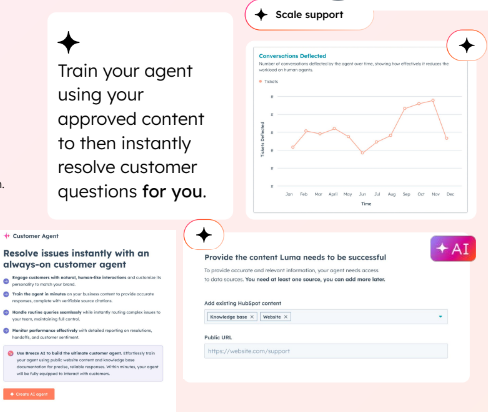
Breeze integrates seamlessly within your HubSpot portal, giving you immediate tools to make your business processes more efficient. The in-depth insights into customer behaviour, improved data quality and targeted recommendations for optimising the customer experience enable teams to make decisions faster, collaborate better and be more successful at every stage of the customer journey. From first contact to conversion and retention, with Breeze at your side you maximise the value of your HubSpot platform!
Marketing Hub updates
The Marketing Hub has once again gained numerous new features. With these new and improved capabilities you can further optimise your marketing processes. Here's an overview:
1. YouTube video publishing
A great new addition on the social media side: publish videos directly from HubSpot to YouTube. This gives you even more control over managing your content strategy. Create, plan and publish your videos straight from your HubSpot platform.
2. Marketing home
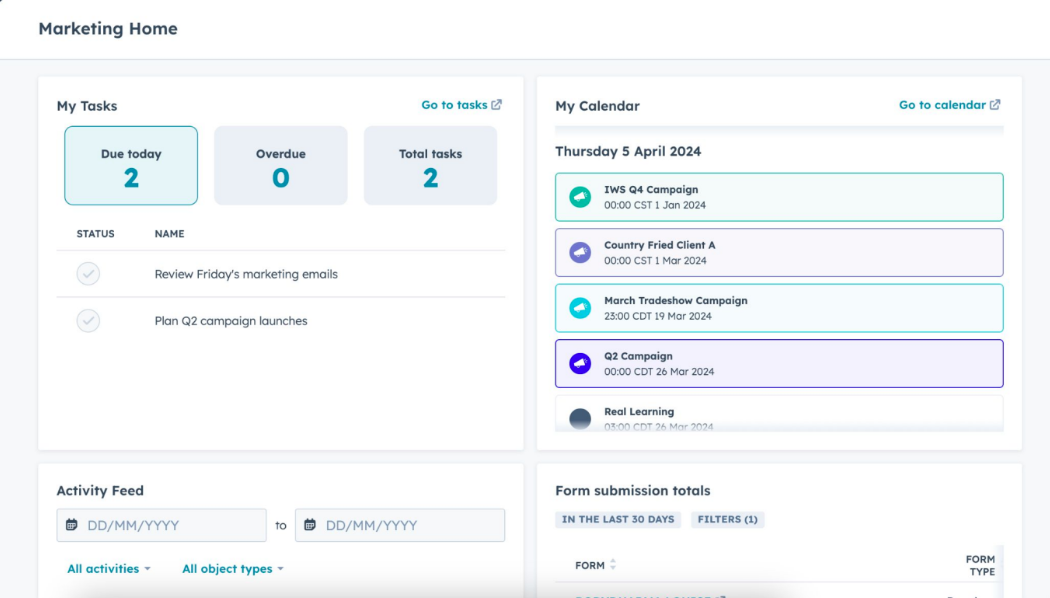
With the new Marketing Home you get a complete overview of all your marketing activities in one central place. From your Home you have access to your campaigns and results, making it easy to set priorities. Managing your marketing efforts has never been clearer.
3. Analytics suite
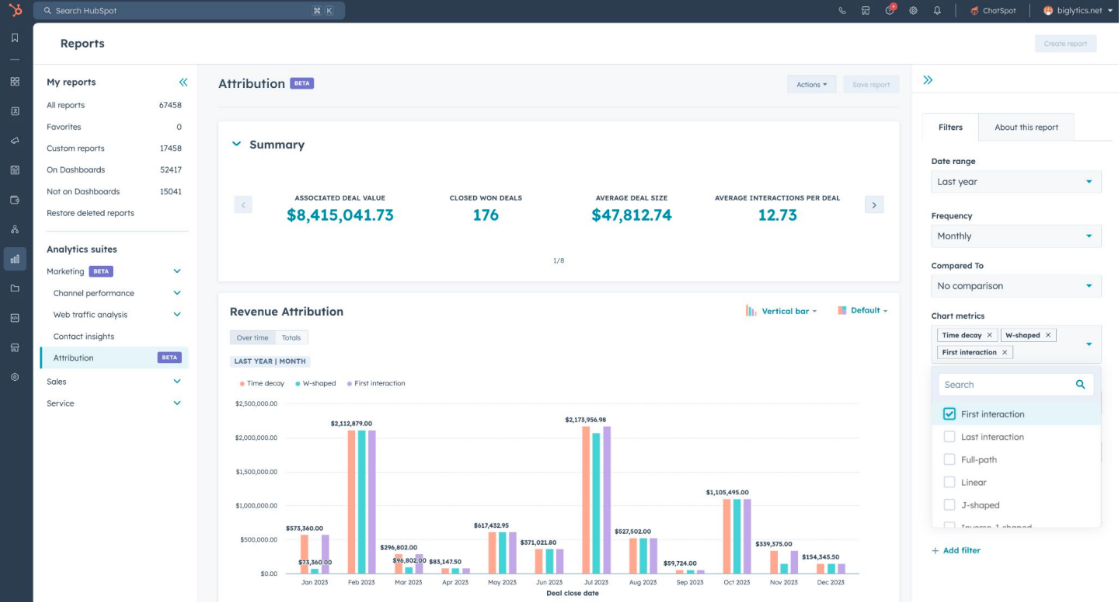
With the fully new Analytics Suite you dive even deeper into the numbers to gain insights into your marketing, sales and service performance. Visualise your data with ease so you can make well-founded decisions.
4. Messaging insights
Messaging Insights give you detailed information about the performance of your messages. Think live chat, emails or other forms of communication, where Messaging Insights gives you direct insight into how customers respond, what the conversion rates are and where you can then optimise.
5. Lead scoring
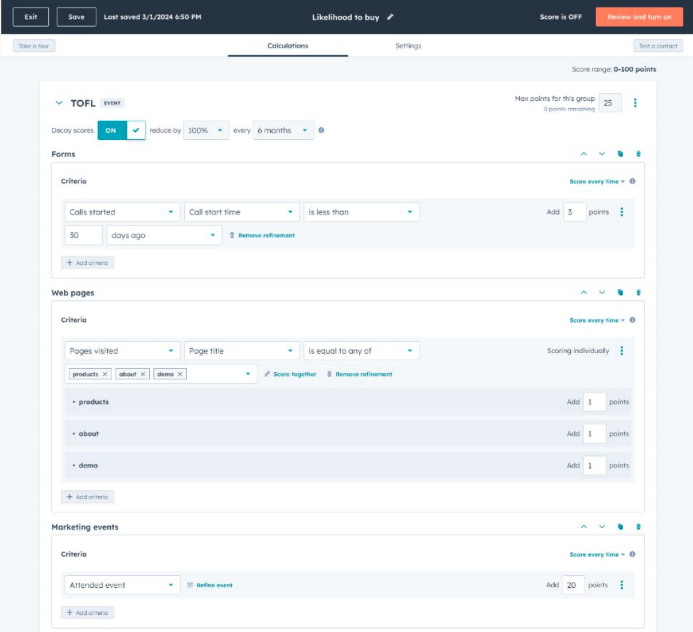
With the great improvements in Lead Scoring you can determine even more precisely which leads are most valuable for your business. By adding more customisable criteria to your scoring, you can better prioritise leads for your sales team, focusing effort on the most valuable prospects.
6. Dynamic forms
The improved Dynamic Forms make it easier to convert leads by showing customised questions based on visitor behaviour. This creates a smoother and more personalised experience, which increases the chance of conversion.
7. Google enhanced conversion
The improvements in Google Enhanced Conversion make it easier to measure the performance of your campaigns. More accurate conversion tracking lets you optimise your Google Ads and improve your ROI.
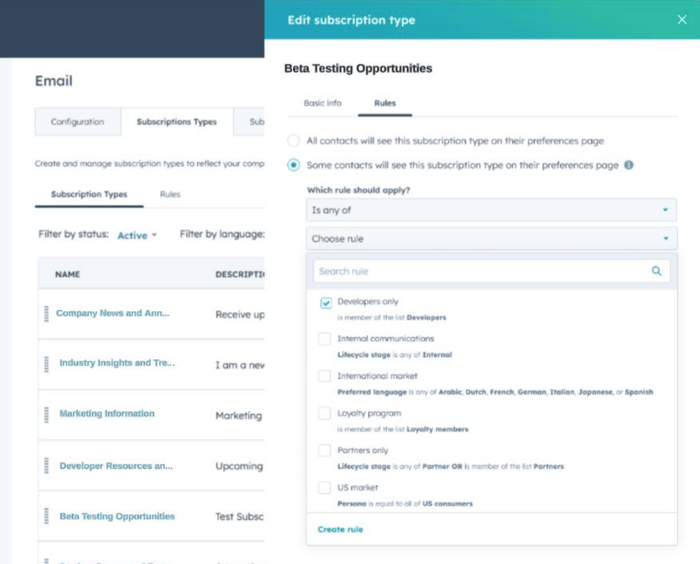
8. Personalized subscription
With the improved personalised subscriptions, you can now give customers better control over which emails they want to receive. This not only increases customer satisfaction but also helps keep your email lists cleaner and more engaged.
Content Hub updates
1. Content remix improvements
With Content Remix, AI makes it easy to "repurpose" content. You point to a source file, for example a website page. You then indicate which formats you want to create. You can choose from landing pages, ads, social posts, audio and images. Videos and podcasts are included too, with optimisations rolled out, and it is now also possible to create case studies!
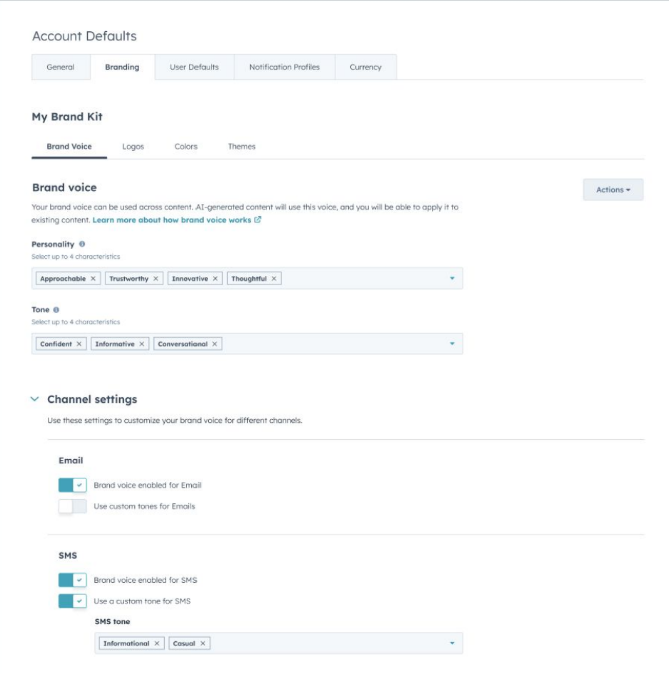
2. Brand voice improvements
It's a challenge for many marketers to maintain a consistent brand identity in text across different formats. Brand Voice uses AI to create consistency through various settings. A number of great improvements have been made here, including support for multiple brand identities, setting specific grammar rules, using languages other than English, and better integration with other tools within HubSpot.
3. Memberships improvements
Do you use or need to manage memberships within your website? More optimisations have been rolled out here too, in the form of member management, the option to have private blogs crawled, and full end-to-end branding control. Small improvements, but with a big impact.
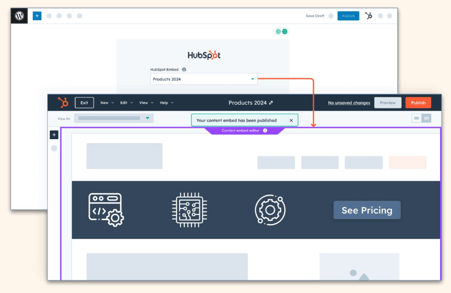
4. Content embed improvements
You can now easily create content blocks within HubSpot that you can then embed directly into, for example, Wordpress, but also into any other CMS. This way you can soon experience the ease of HubSpot within your website (if it isn't already running on HubSpot CMS, of course).
Sales Hub updates
1. Sales workspace
An update that has been in beta for a while now is the Sales workspace. This improved environment increases efficiency by giving salespeople one complete overview of their work. Within this overview you have all your resources immediately at hand, so you no longer need to switch between apps within your portal.
2. Guided actions
With the help of AI, high-impact to-dos are automatically compiled from insights into lead and deal data. This helps you streamline and prioritise your outreach to new leads, and arrive better prepared for the day with your prospects.
3. Predictive deal scores
Easily assess your pipeline with predictive deal scores. AI comes into play here too, based on various factors. Think recent activities, deal value and many other factors.
4. AI meeting assistant
Even more AI! With this meeting assistant, data from your portal is used to help salespeople prepare for meetings as well as follow up properly.
5. Selling queues
Selling queues give salespeople an improved experience when carrying out various actions. This gives them quick and easy context on leads and deals. This way you can easily tick off tasks without moving from page to page.
6. Deal summaries
Many salespeople work on several deals at the same time, each with its own details. With Deal Summaries you get access to a summary of the key information for deals in your pipeline, so you can prioritise the most impactful actions to generate more revenue.
Smart CRM updates
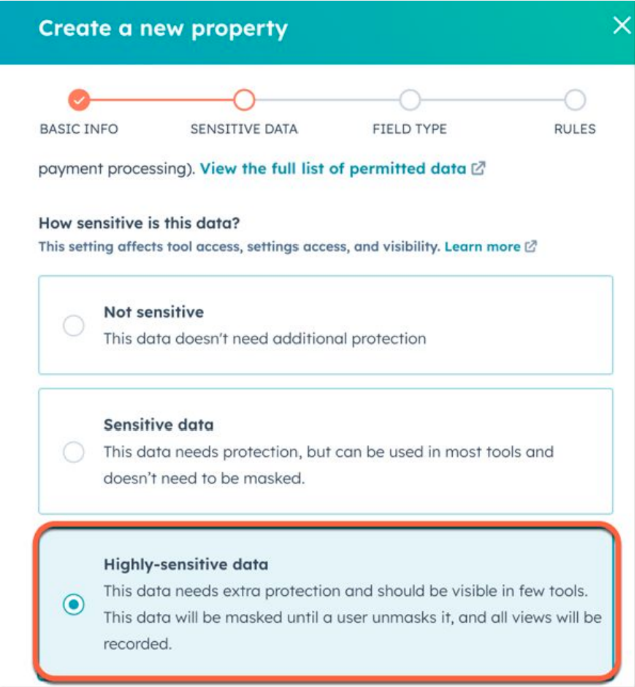
1. Store high-sensitive data
As an Enterprise customer you can now store sensitive data, including personal health information and sensitive data such as national ID numbers. A great step forward in handling data confidentially.
2. Quickly create records
Effortlessly create new contacts, companies, deals, tickets and tasks within HubSpot. This makes things even easier and lets you spend your time faster, so you can focus on primary tasks.
3. Permission changes
New permissions for CRM activities that build on the existing permissions you can give a user. In this case it concerns meetings, calls, notes and emails, for which you can set permissions in the form of: everything, team owner, items they own themselves, or unassigned.
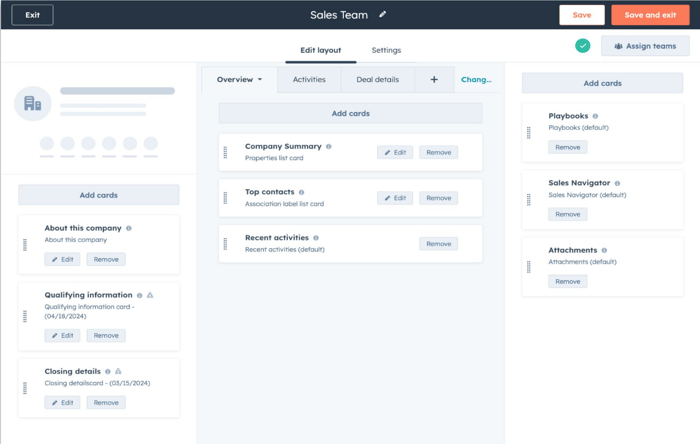
4. Unified record page editor
You can now customise the entire record page for contacts, companies, tickets and deals. This gives you an overview of what your teams see. As a result you can work more efficiently and effectively.
5. Data setup checklist
Getting started with HubSpot can feel overwhelming, which is why there are handy checklists to walk through the basics. There is now also a data setup checklist to help you set up your data model, linked to the relevant places and guidelines. Combined with a number of new industry templates, it's easier to get your data under control.
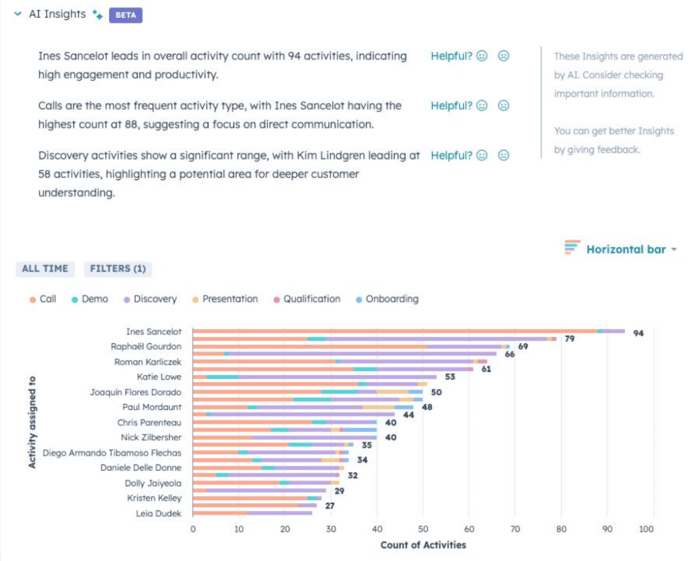
6. AI-assisted insights for reports
With AI support within reports you get quick starting points, so you spend less time interpreting the data and can focus more on making the right decisions. With a simple click you immediately get concise summaries and conclusions!
7. Personalised search results
When you search for companies within HubSpot, the company you clicked on most recently will appear at the top. In the example, the company matched by company name as well as the company the user last clicked on are shown first, a small detail that adds convenience.
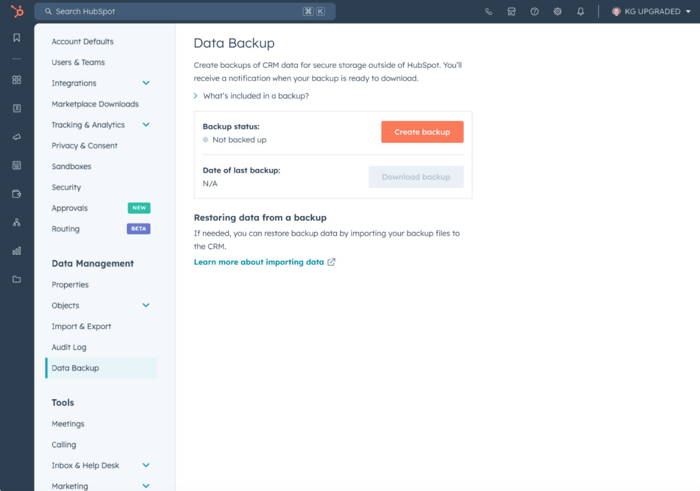
8. Manual CRM backup
It is now possible to create and download a manual backup of your CRM! A great step towards staying more in control of your data, as it builds in an extra layer of security.
9. Export approvals
You can now set permissions so that users cannot create exports without approval. This always requires someone with the right permissions to approve the export.
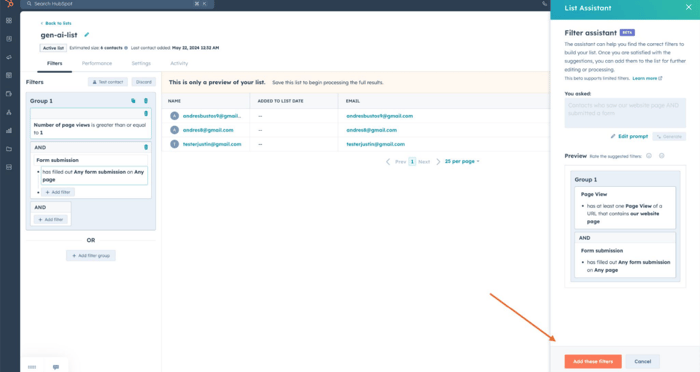
10. AI assistant in lists
Describe the list you want to create using AI and it is set up for you with the right filters. This means you no longer have to scroll endlessly through properties, and creating lists becomes far easier.
Operations Hub updates
1. Advanced workflow use cases
New workflow features have been added for even more flexibility in your workflows. We already know webhook triggers within workflows, but now you also have the option, with advanced data transfer, to share values in the form of tokens within custom code actions, webhooks and custom workflow actions.
2. Data sync updates
Updates within data sync make it even easier to connect apps with HubSpot. Improvements to custom object sync make it possible to sync third-party custom object data directly with HubSpot standard objects. You can also test this connection directly with your data before going live.
3. Data quality improvements
With Operations Hub you can easily keep your data clean, so your data also stays of high quality. Because Breeze can now apply real-time deduplication, cleaning up your portal is even easier! You get a weekly overview of your data quality, so you can stay on top of it.
4. Datasets improvements
Datasets are used to compile and transform your CRM data. In addition to the existing formulas and functions, datasets now offer the option to link CSV data directly with HubSpot data. It is also possible to include all dataset objects directly in a workflow, allowing you to apply even more advanced automations.
5. Datasets repackaging
You can now create up to five fully customisable datasets with Operations Hub Professional. Easily combine items, build formulas, and transform and manage data. Ready-made datasets are now also available to make getting started with datasets even easier.
Would you like to know more about the many possibilities of HubSpot? Then schedule a free call with Carel or get in touch with Sander!