HubSpot CMS: Why Choose It?
 Carel Schrier
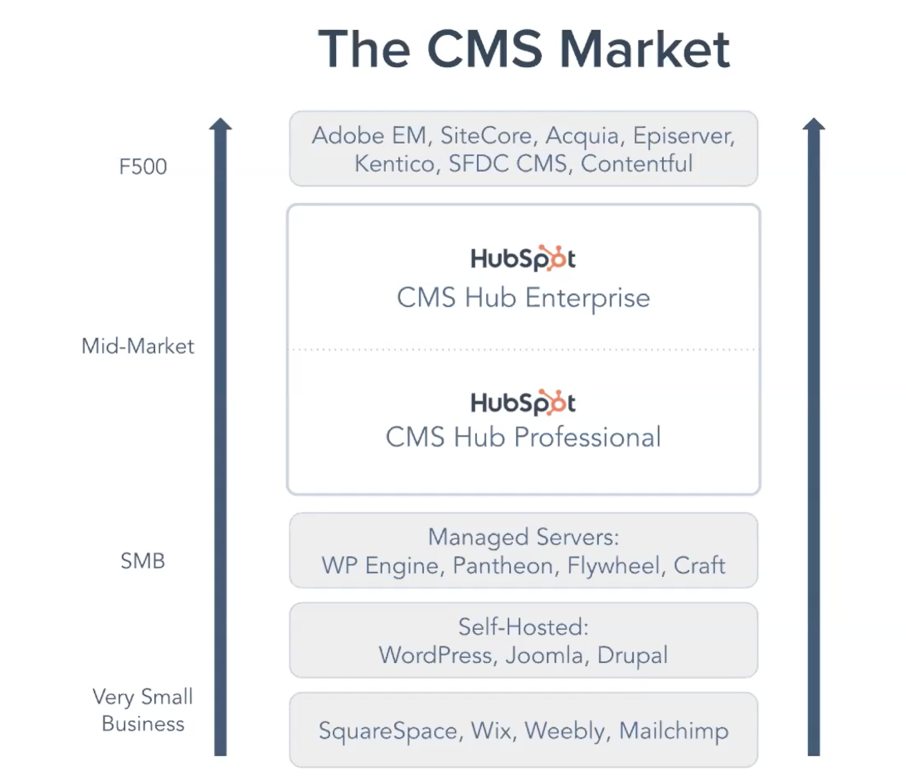
There are many options today for building a website. Think of a CMS such as WordPress, Wix, Drupal, and so on. Many of these CMS systems have their own pros and cons. WordPress is a free, open source CMS system used by many companies. We often use this CMS system for our clients too. However, a new player has recently entered the market: HubSpot CMS. Here you can choose between CMS Hub Professional and CMS Hub Enterprise. This mid-market CMS system offers you an enormous range of options, and when you combine it with CRM data, Marketing Hub, Sales Hub, and Service Hub, you unlock a host of fantastic possibilities. We would like to explain more about this CMS system.

Future-proof
One of the reasons this makes us so happy is the scalability. You can make use of a theme. Note that this is not the same as how themes work in WordPress, we will come back to that shortly. A theme in HubSpot is essentially the outer shell of your website. You adjust the colours in it and can tweak a few other global elements, including fonts and backgrounds. You can simply get a theme for free from the HubSpot Marketplace or you can have one designed for you.
The theme includes a number of ‘basic’ pages that you can customise as you wish. This works through an extremely simple drag and drop builder. You can simply drag so-called modules onto a page or remove them, so you have a new page ready in no time. No code required, no developer required, and no hassle.
The great strength across all the Hubs that HubSpot offers lies mainly in personalisation. You can apply this throughout your entire website using the CMS. When a visitor meets a condition you set, they will see different content. This way you respond to the customer journey of your visitors and create a unique experience.
Growth Driven Design
As mentioned, plenty of websites are still built in WordPress, Wix, or other CMS systems. These are often websites built entirely to a custom brief, and after a year or two you need to carry out a complete redesign again. On top of that, you are continuously spending money or putting a lot of work into optimising your website, only to then open your wallet again for a redesign and start improving all over again.
Of course, it can be done differently! That is where Growth Driven Design comes in. With this approach a website can be launched faster, and you can optimise your website as you learn. This way you can spread your investment over a longer period with better results. You then work from so-called data driven choices and have flawless insight into where improvements are needed. It is not a website that is only built because it looks ‘nice’, but one that gives your customers a better experience and ultimately leads to better results.
Safety first!
The security of your website is important, and Google and other search engines are strongly in favour of it too. An SSL, or Secure Socket Layer, is a basic requirement when it comes to websites. The great advantage of HubSpot CMS is that an SSL certificate is automatically included. So you do not need to worry about the security of your website or about purchasing an SSL certificate on top of your hosting.
SEO
Google keeps continuously improving its algorithm around findability, or SEO. To know exactly which optimisations you need to make on your pages, HubSpot will give you recommendations. The CMS integrates with Google Search Console. This means it continuously measures which keywords rank in which position, and opportunities are identified.
A/B testing
There are plenty of tools for setting up A/B tests to help you get better results from your website. This is built directly into HubSpot CMS. You can set up an A/B test on any page with up to 5 variations. After a period, HubSpot will automatically roll out the best performing variant.
Migrating from another CMS? No problem!
Do you currently have a website in WordPress or another CMS and want to switch to HubSpot CMS? No problem! You can make use of the website migration that HubSpot arranges for you. This is free up to a certain point, depending on the size of your website. A website migration specialist will support you throughout the entire process. The migration specialists will develop a theme and a number of template sets that are almost identical to your current website. Any current blogs you have will also be transferred, and everything will work almost the same as before. With the emphasis on almost, since some elements cannot be copied exactly one to one. Of course, we can also help and support you with the migration of your website.
Update multiple pages at once with HubDB
Of course, you can update your content in different locations, but HubDB can create dynamic pages and thereby push auto-updates to multiple pages. This is ideal for websites with web pages that share the same layout. Think, for example, of product lists or job vacancies. This way you do not need to create a new page every time.
Professional vs. Enterprise
There are a number of extra options when you choose Enterprise CMS. Think of so-called ‘memberships’, custom CDN configuration, and more. For a full comparison, you can see it here.
HubSpot CMS
In short, there are plenty of advantages to being ready for the future with the simple drag and drop HubSpot CMS. Optimally steering the customer journey is something that allows you to become more and more personal towards your (potential) audience.
Would you like to know more about the CMS? Feel free to book a meeting in my calendar!