HubSpot Operations Hub: new!
 Carel Schrier
What news! Last week HubSpot launched a completely new hub. A big step towards becoming the #1 CRM platform in the world!
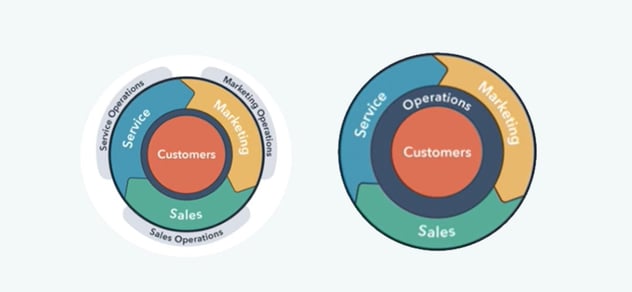
The perfect addition to the Marketing, Sales and Service Hubs is... Operations Hub. A Hub full of tools that can be used for integrations, automations and data quality.
Using HubSpot to its full potential drives growth. Part of this is also internal growth, meaning more teams and more business processes. There is a good chance that some things start to take on a life of their own. Data that no longer lines up everywhere, and systems that do not synchronise correctly. All points that can create friction in the customer journey, but that you want to spend as little time on as possible.

Why HubSpot Operations Hub?
First, an overview of the benefits for you. Especially for larger organisations that use multiple systems and work from multiple teams, Operations Hub can be the perfect solution.
1. Customer data synchronised between business applications
2. Cleaning up of customer data
3. Customised automation results in less friction throughout the entire business process
Which tools are available with Operations Hub?
1. Data syncData sync works with various business applications. By using data sync, you ensure that all customer data is aligned in real time across the systems being used. Data sync currently provides access to various integrations. This number will keep expanding and can be found in the HubSpot Marketplace.
Data sync operates in real time, making it far more accurate when it comes to data compared to standard integrations. Standard integrations relied on a trigger, which meant the data was not always consistent. In addition, standard integrations do not work for everyone. You are often dependent on a standard setup in which data synchronises in one direction only. Data sync solves this, because you decide yourself at which moment and which information is passed between applications. On top of that, historical data is also passed along, whereas standard integrations only capture data from the moment of integration onwards.
2. Programmable automation
The possibilities for workflows are endless with Operations Hub! Where previously you could already put a lot of creativity into workflows, you were still tied to HubSpot's predefined actions. That is now a thing of the past, because it is possible to use code within HubSpot workflows.
With the help of custom code, webhooks and bot actions it is possible to create customised workflows and chatbot actions. Think, for example, of the HubSpot lead score becoming more accurate. A contact record is enriched with data via an integration, which means a lead may be warmer than initially thought.
3. Data quality automation
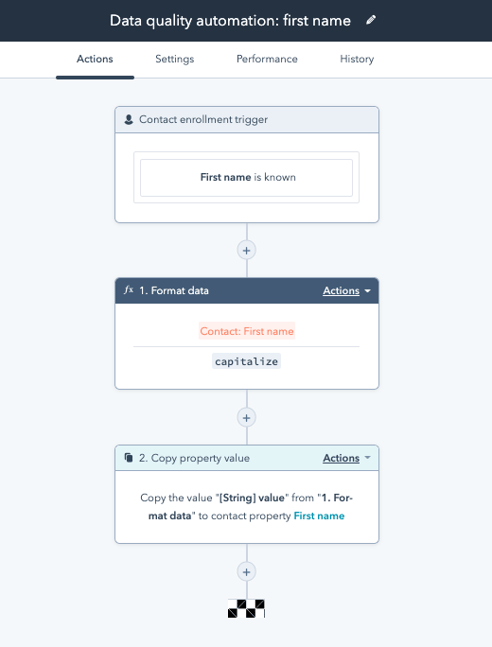
The more colleagues working within HubSpot, the greater the chance that data quality deteriorates. Think, for example, of capitalisation, phone number formatting and how a date is entered. Important to keep tidy, but a waste of time. With HubSpot Data quality automation, cleaning up your data is done in no time!
This tool can be used within workflows with the format data action. So you set it up once, and after that the data will automatically stay clean. The data in HubSpot, but also directly in the connected systems and applications, will then all be neat and tidy.
Cost of HubSpot Operations Hub
As we are used to, Operations Hub is also split into different packages and is also included in various bundles. You can already get started for free, but for more possibilities you will soon need to look at a Starter or Professional package. For Starter you pay €46 per month, and for Professional €736 per month. With the launch of Operations Hub, the bundles have also been adjusted slightly, allowing you to use all hubs more cost effectively.
Would you like to know more, or do you need help exploring the possibilities for your organisation?
Please contact us for help.