The new HubSpot updates from July 2024
 Carsten huiskamp
Discover how adding beta features to your HubSpot account can take your business to the next level!

New product updates from HubSpot
Now that July is nearly over, it's time to look at the most recent HubSpot betas from the past month. Curious about the possibilities these updates bring? I'm happy to tell you more!
Updates in this blog:
- User out of office for inbox and helpdesk
- New workflow actions for associations
- Deal insight with custom views
- Configure default settings for activity association
- Configurable sending limits
- Creating datetime properties in HubSpot
- Mobile lead management
User out of office for inbox and helpdesk
With User Out of Office settings, Admins and individual users can set when they are unavailable based on the user's time zone. When a user is out of office, their availability status changes to "Away" and they become ineligible for automatic assignment in inboxes or Helpdesk.
You can set this up in the user record (under Settings > Users & Teams). Here, Admins and users can set their individual office hours and time zone by navigating to the preferences tab and the working hours sub-tab.
New workflow actions for associations
Admins can automate parts of the association management process through workflows. They can use new association actions within their workflows to apply, update or remove association labels, and create new associations based on matching properties.
In the past, managing associations and their labels was a tedious, manual process. With this new functionality, administrators can automate a number of these processes, improving data quality while reducing manual work. As companies grow, it becomes harder to keep managing associations manually, especially as usage increases.
Deal insight with custom views
Deal insights give a quick overview of all deal information at the top of all your deal views. With this update, when Insights is enabled for a portal, you can now see the Deal Insight section in all your deal views on index pages, instead of only viewing the data in the default deal views 🎉
Configure default settings for activity association
In the new settings user interface, administrators can configure the default logic for linking activities when logging certain activities on contacts, companies, deals, tickets and custom object records. They can now set default logging rules based on where the activity was originally logged (e.g. contact record), the activity type (e.g. task) and the associated records to log the activity to (e.g. log to primary company).
Note: for now, customers cannot configure email logging logic in the beta. HubSpot is working on making this available as soon as possible.
Configurable sending limits
As an administrator, it is essential to ensure that your team's emails are delivered successfully and that your company maintains a strong reputation for email sending. An effective way to achieve this is by setting guidelines in HubSpot that follow best practices, for example limiting the number of emails that may be sent daily. Although HubSpot applies default daily limits based on email provider limits to protect your integration, sending too many emails can put content quality at risk. By lowering the daily sending limit, your sales team gets more room to personalise emails and focus on the most valuable leads.
Creating datetime properties in HubSpot
You can now create custom DateTime properties in HubSpot CRM, allowing you to store more types of data in the CRM.
Why this matters?
With this new field type, you can gain more insight from your CRM into when something happened. Some use cases include:
- Manually editing time to record when something happened across the whole CRM
- Requiring a datetime property when a deal record is created
- Copying property values between default and custom datetime properties via a workflow
Mobile lead management
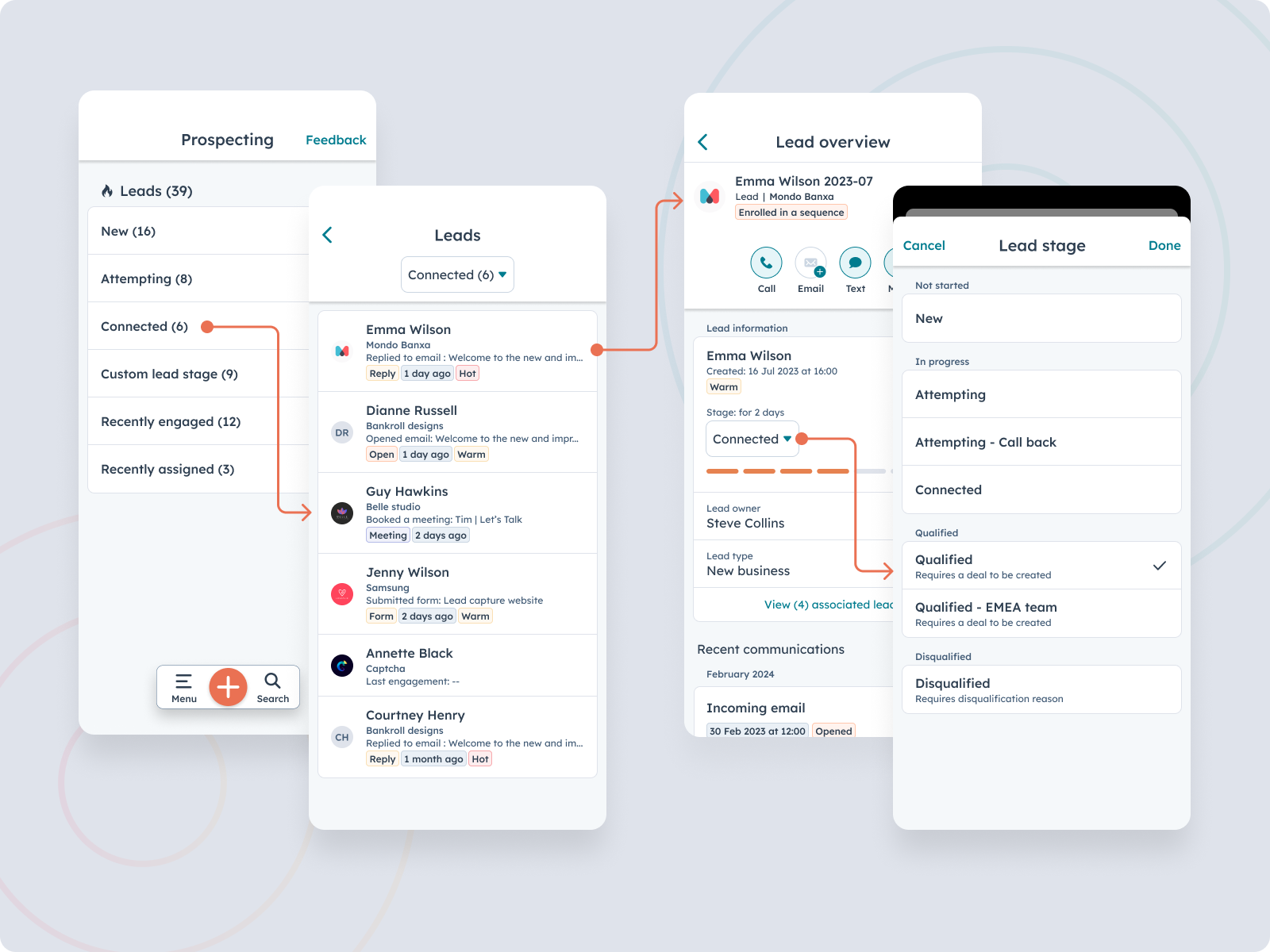
HubSpot is bringing lead management capabilities to the mobile app to help users prospect and qualify leads from any location. This first MVP version of mobile lead management will help BDRs (Business Development Representatives), SDRs (Sales Development Representatives) and full-cycle sales reps with the basics of lead management on the go, including: lead navigation through the various defined lead stages, lead outreach and lead qualification.
Want to know more about these betas or discover other possibilities with HubSpot? Book a free call with Carel or get in touch with Sander.