Better together: The Leadinfo & HubSpot integration
 Carel Schrier
Discover the power of the integration between Leadinfo & HubSpot and significantly improve your marketing and sales processes. From prospect to deal with this powerful combination!

Better together: The Leadinfo & HubSpot integration
In the world of marketing and sales, everything revolves around building strong connections and attracting valuable leads. It is no surprise, then, that companies are constantly looking for ways to optimise their lead generation and CRM processes. One interesting development is the partnership between Leadinfo and HubSpot. In this blog, we explore the strength behind this partnership and what you can do with the integration of these two tools.
Leadinfo & HubSpot complement each other
Leadinfo is a powerful tool that helps companies gain more insight into their website visitors. It enables companies to convert anonymous website visitors into qualified leads. Using advanced technology, Leadinfo tracks visitor behaviour on your website and provides insight into which companies are visiting your site, which pages they view, and how long they stay. With these insights, you can then respond quickly to market changes and act on them. This all happens automatically, saving your marketing and sales teams valuable time and effort.
HubSpot is a leading platform that helps companies streamline and improve their Marketing, Sales and Service processes. The platform offers a wide range of tools and features that enable organisations to manage customer relationships, generate leads, optimise marketing campaigns and improve the overall customer experience. Overall, HubSpot gives companies the tools and insights they need to improve their marketing, sales and customer service processes, build customer relationships and grow in an increasingly competitive business environment. By combining these two powerful tools, you easily move from prospect to deal.
Seamless integration with HubSpot
The power of the partnership between Leadinfo and HubSpot really becomes clear when you integrate these two platforms seamlessly. The integration between Leadinfo and HubSpot allows you to synchronise the data you collect with Leadinfo directly with your HubSpot CRM. This opens up a world of possibilities for personalised marketing campaigns, effective lead follow-up and accurately measuring your ROI. HubSpot then allows you to keep a close eye on everything through dashboards and reports. With the partnership between Leadinfo and HubSpot, you easily move from prospect to deal.
The benefits of the HubSpot integration:
1. Link website visitors to existing companies within HubSpot
One of the most valuable aspects of this integration is the ability to identify website visitors and link them directly to existing companies in your HubSpot CRM. This means you can see exactly which companies are visiting your website and link that behaviour to your existing customer profiles. This gives you better insight into the interests and behaviour of your current customers, which can lead to more targeted marketing and better customer relationships.
2. Create new companies in HubSpot from Leadinfo
Tracking which pages your website visitors view is crucial for understanding their interests and buying behaviour. The integration makes it possible to automatically send this information to HubSpot, where it is linked to the relevant company. This gives your sales team valuable insights that can be used to personalise and optimise conversations, ultimately leading to higher conversion rates.
3. Create deals and link them to the right company within HubSpot
Another benefit of the integration is the ability to create deals directly in HubSpot and link them to the right companies. When a lead is ready to move further along the customer journey, you can easily create a new deal and ensure that all relevant information is correctly linked. This makes managing your sales opportunities more efficient and organised.
4. Create tasks for yourself or colleagues with HubSpot
Finally, the integration offers the option to create tasks in HubSpot, both for yourself and for colleagues. This ensures that everyone on your team knows exactly what action needs to be taken and when. By automatically generating tasks based on website visitor behaviour, you can work proactively and efficiently, leading to better collaboration and higher productivity.
How do you connect HubSpot to Leadinfo?
Step 1: Log in to the Leadinfo portal and go to settings.
Step 2: Under integrations, select "HubSpot".
Step 3: Click "Connect with HubSpot".
Step 4: Log in with your HubSpot details and give Leadinfo permission to access your HubSpot environment.
-png%20(1).webp?width=695&height=201&name=Group%204%20(2)-png%20(1).webp)
Note: you must connect an account that has the right permissions in HubSpot!
Step 5: Once you have connected HubSpot to Leadinfo, you can determine the settings for your integrations. You need to decide:
- Whether you want to automatically link website visitors to existing companies within your CRM.
- Whether you want to automatically share visited pages as notes within a company profile.
- In which language the notes should be posted.
- Select the fields you want to send to HubSpot.
.webp?width=667&height=549&name=Schermafbeelding%202022-04-01%20om%2009-18%201-png-3%20(1).webp)
How do you automatically forward leads to Leadinfo?
Now that you have made the connection, no data is yet being sent to your HubSpot environment. To do this, you first need to link a company to HubSpot. You can do this manually or automatically.
The steps below explain how you can automatically connect companies to HubSpot.
Step 1: Think about which companies you want to send to HubSpot. Use the questions below to get a clear picture of the companies that are of interest to you.
- What characteristics does an interesting company have?
- Are you focusing on certain industries or specific sizes?
- What behaviour should an interesting company show on your website?
- How many pages or which pages should a company visit?
Step 2: Based on the questions in step 1, you will start setting up triggers. Navigate to "Trigger" in the menu and click "New trigger" in the top right.
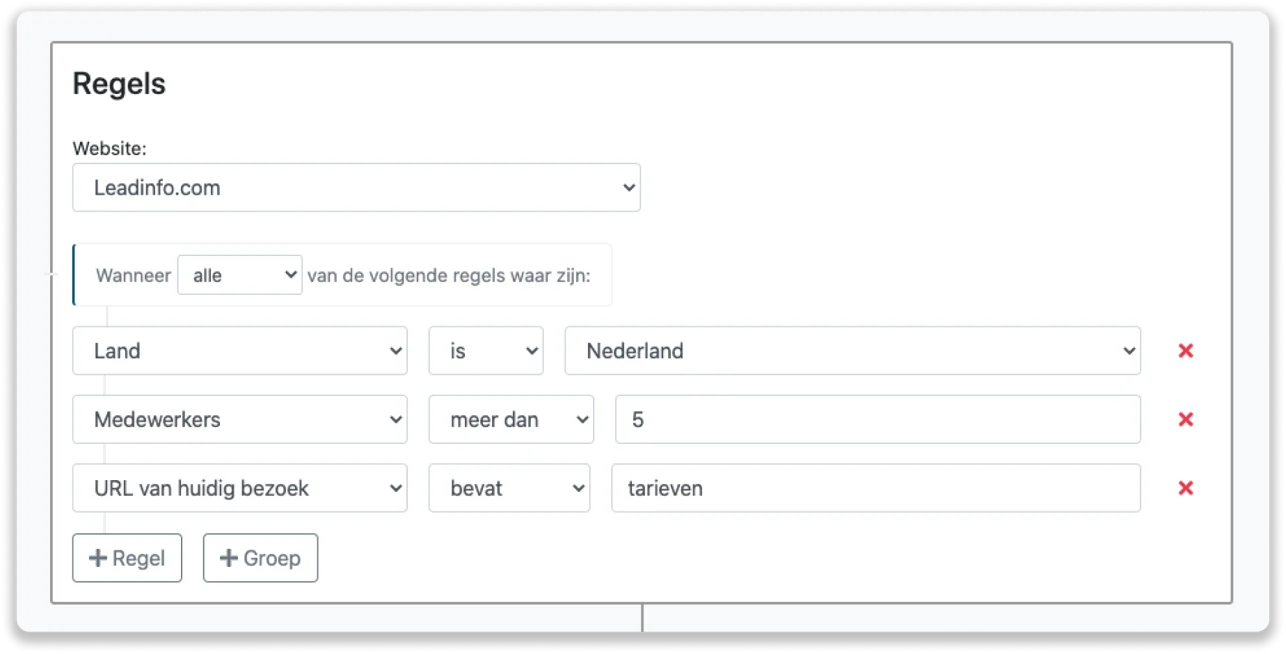
Step 3: Determine the rules a company must meet to be forwarded to your CRM. In the example below, for instance, we only want to forward Dutch companies with more than 5 employees that have visited our pricing page.
Step 4: Under "Action", select the CRM system you connected in step 1 and determine what you want to do with the company.
- Only create new companies - Leadinfo immediately creates a new company within your CRM system.
- Only connect to existing companies - Leadinfo only links website visitors to existing companies within your CRM.
- Create a new company or connect an existing company - Leadinfo creates a new company or, if the company already exists, connects it to an existing company in your CRM system.
Step 5: Select who should be the owner of the company within your CRM and activate this action.
Note: do not forget to save the trigger in the top right!
Conclusion
In short, the integration of Leadinfo with HubSpot gives companies a powerful combination of insight and efficiency, allowing you to significantly improve your marketing and sales processes. By identifying website visitors, automatically creating new companies, forwarding visited pages, creating deals, and creating tasks, you can make optimal use of your CRM systems and convert valuable leads into customers more effectively.
With the synchronisation between Leadinfo and HubSpot, you always have access to up-to-date data and insights, leading to more targeted marketing campaigns and higher conversion rates.
Would you like more information and/or help connecting your Leadinfo to HubSpot? Feel free to book a call!