The new HubSpot updates from March 2024
 Carsten huiskamp
Discover how adding beta features to your HubSpot account can take your business to the next level!

New product updates from HubSpot
It is March again, which means a fresh batch of new HubSpot betas is available to us. These new betas bring exciting possibilities and can take your HubSpot portal to the next level. Let us take a look at some of these new features and how they can help you optimise your HubSpot account.
Updates in this blog:
Google Consent Mode V2 support
HubSpot's Google Tag Manager and Google Analytics integrations now support Google's new Consent Modes when using the HubSpot cookie banner. Due to the policy update introduced by Google, companies advertising to visitors from the EEA/EU/UK must use a strong framework for collecting and communicating end users' consent choices with Consent Mode. Otherwise, websites may experience measurement loss on Google Ad campaigns.
If you want to keep using measurement, ad personalisation and re-marketing features, you must collect consent for the use of end users' personal data in the regions mentioned above and share consent signals with Google. These requirements also apply if you use Google Analytics data with a Google service.
Cookie consent banner customisation
With the introduction of Google Consent Mode V2, HubSpot has improved the cookie consent banner settings with new customisation options. You can now adjust the colours, positioning, shape and size of the banner so that it better matches your site's design and user experience.
Importing offline event data into HubSpot Marketing Events
You can now import all your marketing events into HubSpot for offline (in person) events too. This means you can import all your marketing events into HubSpot, choosing from a range of integrations for your online (virtual) events and using the new import flow for offline (in person) events.
What is the impact of this?
HubSpot becomes a centralised one stop shop for all your marketing event activities, including event information, performance overview of registrants, attendees, and so on. With all your marketing event data in HubSpot, you can manage and automate your marketing event activities with a range of features, such as lists, reports and campaigns for the event.
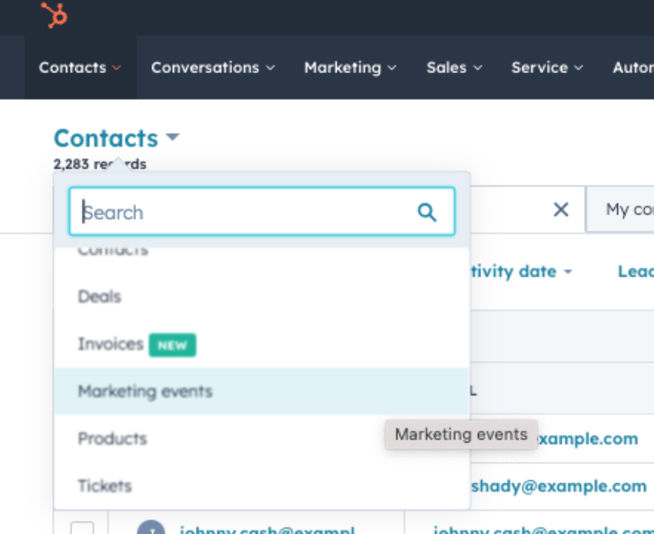
You will find the marketing event activities under Contacts > Marketing events.
Automated "close date" for deals and tickets
When a user moves a deal or ticket record to a closed pipeline stage, the "close date" of the record is automatically set to today's date. This saves users time, as they no longer need to set the date manually.
If you would rather not use this, you can always adjust this feature. You will find it within the pipeline settings under "Templated Automations".

Custom user working hours for Inbox and Helpdesk
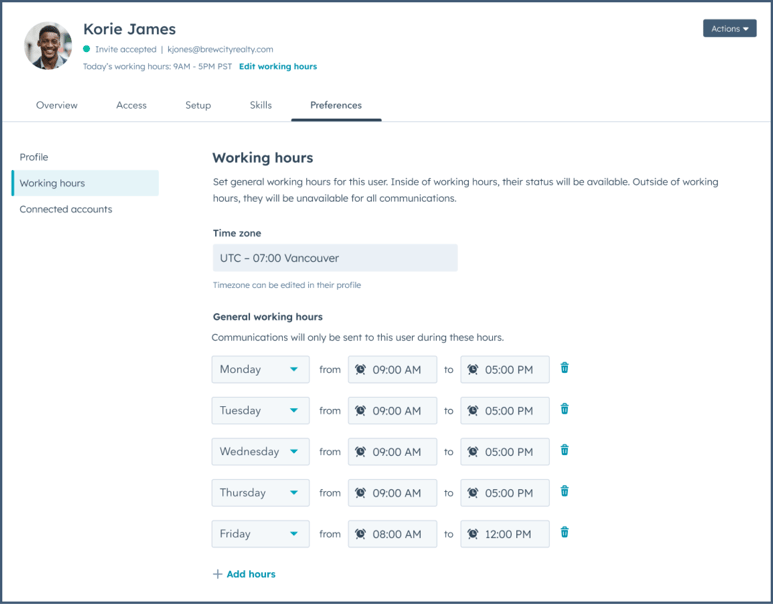
User working hours allow admins and individual users to set weekly working hours based on the user's time zone, which may differ from the time zones of the account or their team. When a user is outside their working hours, their availability changes to "Away" and they become ineligible for automatic assignment within inboxes or the Helpdesk.
Users can manually change their availability status on the user details page, inbox or Helpdesk, and the new status will be reflected everywhere.
Design update for booking meetings on behalf of other users in the CRM.
HubSpot has rolled out a number of design updates that make booking meetings for others more efficient. You can now see all your users and all your rotations by scrolling and using the "see more" option. You can also always search for the specific person or the meeting rotation you are looking for.
Why does this matter?
When booking meetings for others via a CRM record, you can now easily find and browse all your users and all your meeting rotations without needing to use the search function. For users who often book meetings for the same colleagues or use the same rotations, HubSpot has made sure that the most recently booked users and rotations are sorted at the top of the list. This saves you time finding the right person for the meeting.
ChatSpot Copilot in HubSpot
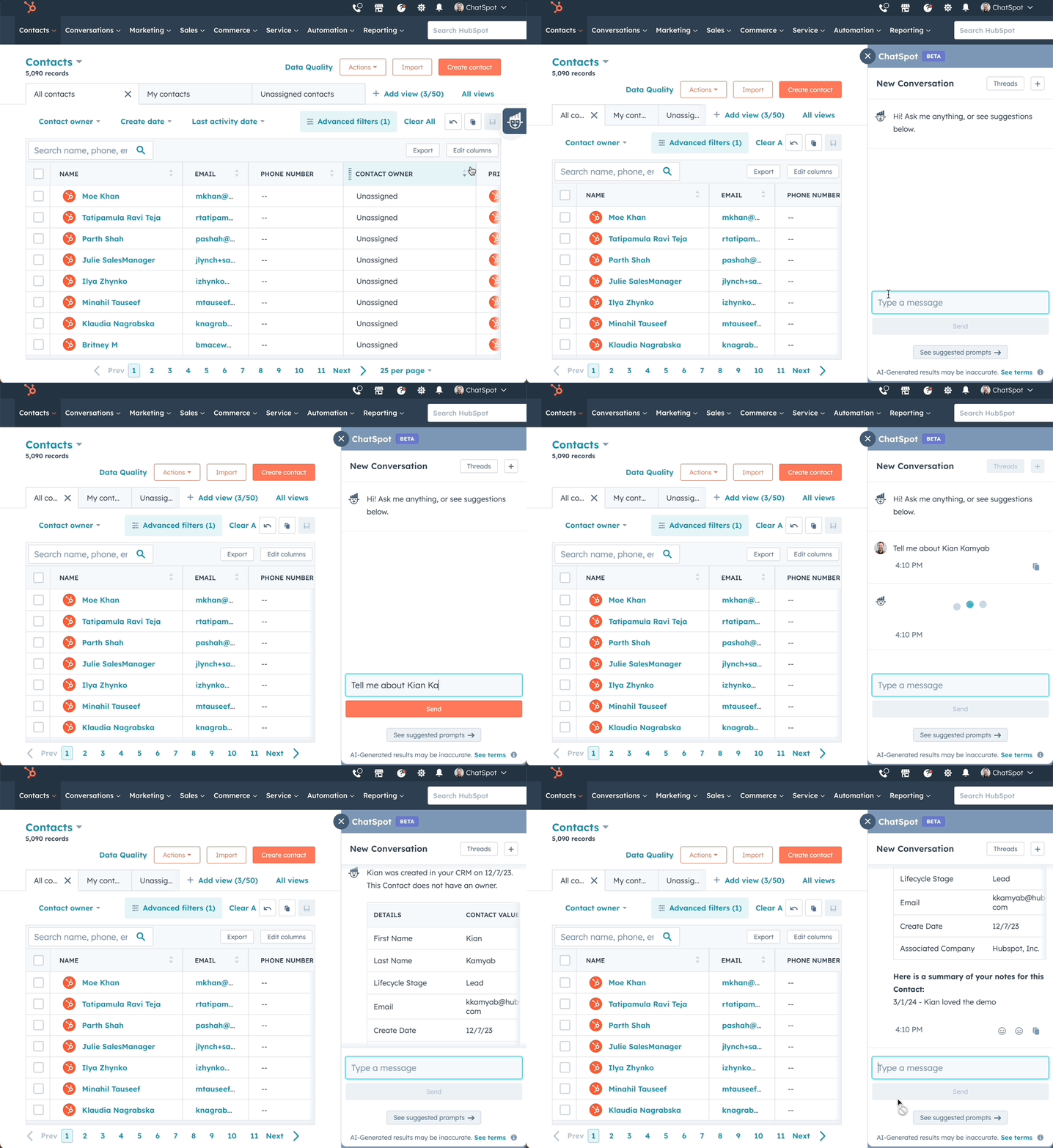
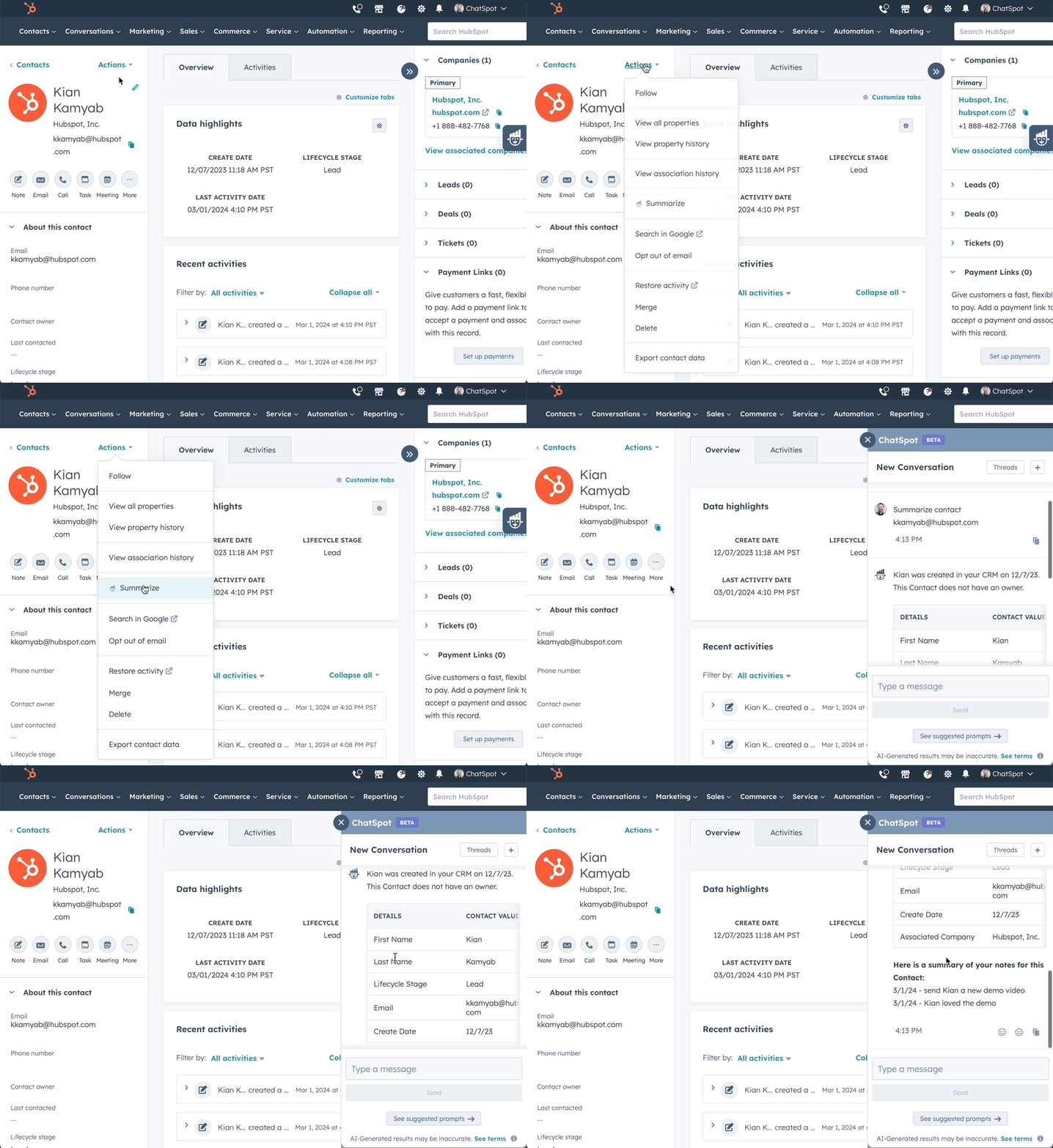
HubSpot has integrated the standalone ChatSpot app into HubSpot. As a result, ChatSpot is now accessible in two places within HubSpot, namely:
- The CRM index page for default objects
- The CRM record page for default objects
To open ChatSpot, click the logo on the right hand side of your screen while on either of these pages.
You can also open ChatSpot:
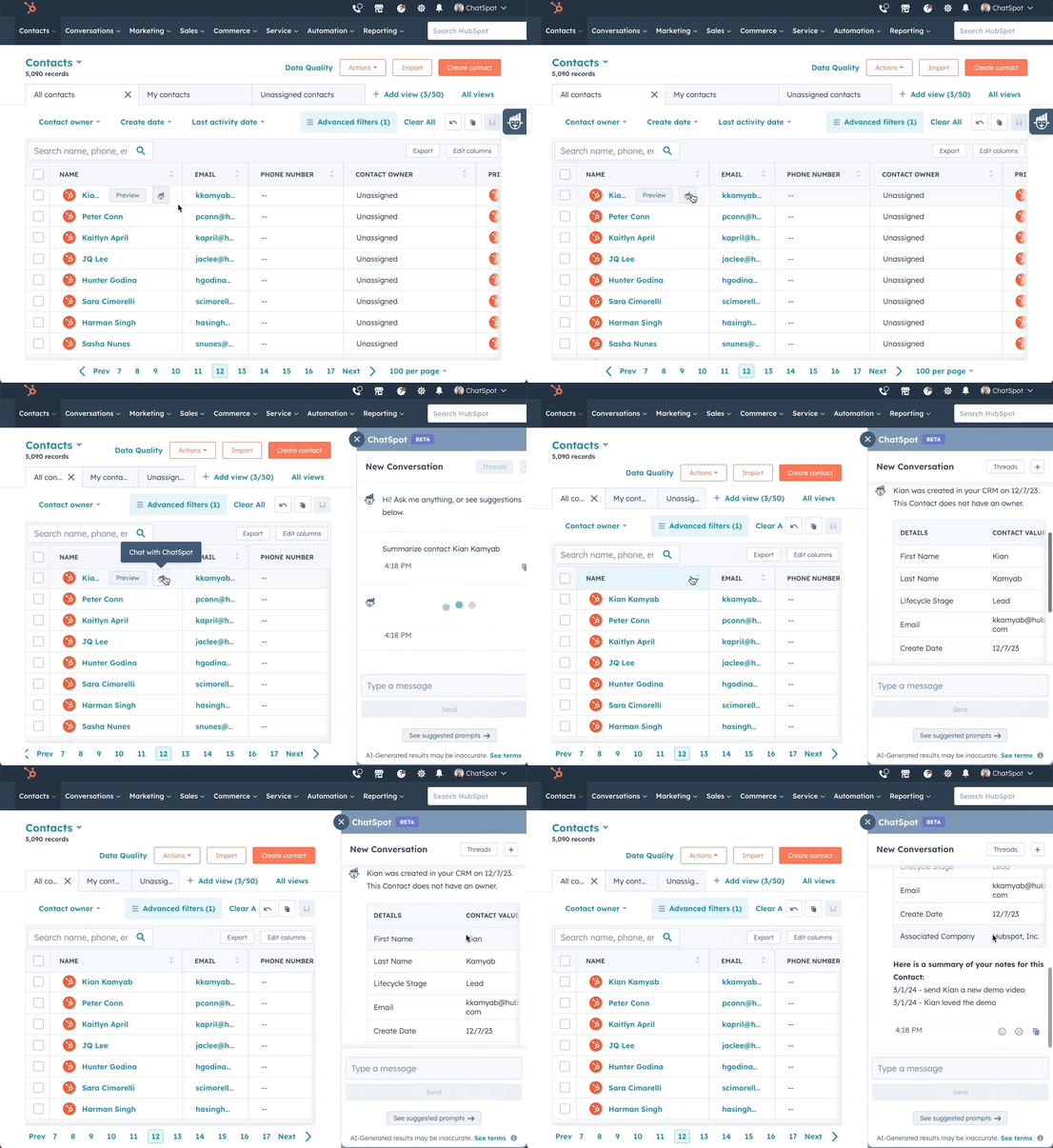
- On a CRM index page for a default object: hover over a row and click the ChatSpot logo
- On a CRM record page for a default object:
(All default records) Click Actions -> Summarise in ChatSpot
(Company records) Click Actions -> Show news for this company in ChatSpot.
New suggested activity: contacts re-engaging
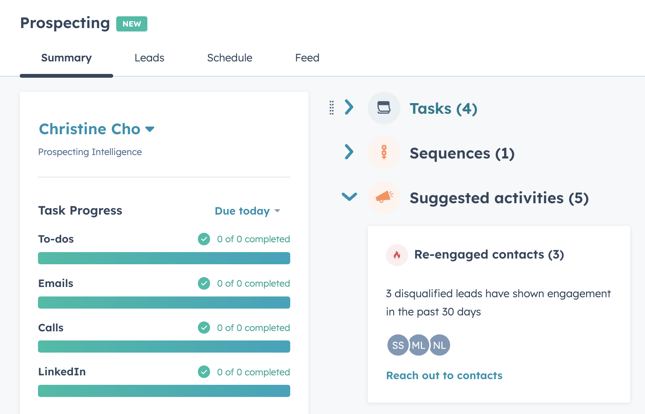
In the prospecting workspace, sales reps can now see a list of contacts who have reached out again after being marked as disqualified.
Why does this matter?
It is important for sales reps to be able to respond quickly when leads show renewed interest. Even a simple website visit or a form submission can mean they now have the budget, time or interest to move forward and do business with your company.
By showing contacts who have reached out again through suggested activities in the prospecting workspace, we make it easier for sales reps to reconnect with those leads and track all interactions in the CRM.
What does this look like?
The new suggested activity appears on the overview tab of the prospecting workspace and is called "Re-engaged contacts".
Converting a blog post into a spoken blog
Meet text to speech for your blog content. This feature converts the content of your blog posts into engaging text to speech audio via a built in module. You can also choose from several voices for your audio content.
Why does this matter?
HubSpot wants to make it easier for content creators to repurpose their blog content for users who prefer audio consumption.
You will find the "Post Narration" option under your blog settings. You will also find an example of this at the top of this blog.
Our opinion: not bad, although the accent is very American.
AI powered quick replies
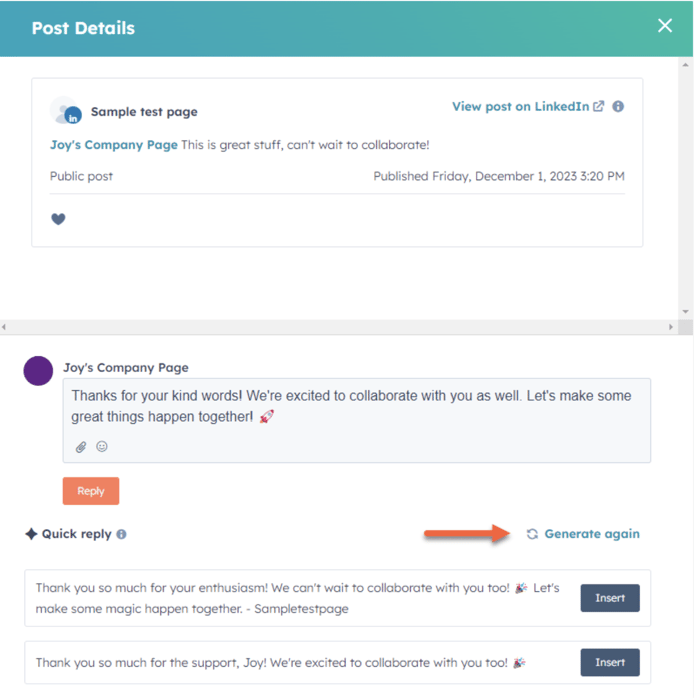
When someone mentions your brand on social media channels, you can now respond quickly with just one click. HubSpot analyses the context of the conversation and ensures your replies are not only fast, but also tailored to the nuances of your audience.
Why this can be useful?
Marketers juggle countless responsibilities, from monitoring their audience's social media interactions to responding quickly. With an abundance of tasks and challenging discussions on public channels, these marketers often run short on time. HubSpot is therefore simplifying the process, making it easier for users to maintain a thriving community. By providing help with drafting replies, users can respond faster and build a stronger relationship with their leads and customers on social media.
Want to know more? Book a free call with Carel or get in touch with Sander!