In many HubSpot portals, a contact's lifecycle stage changes (for example, from Lead to MQL), but the information needed at that point for further qualification isn't enforced. As a result, sales is missing crucial information, marketing has to work with incomplete data, and automations can stall or become unreliable.
What's new?
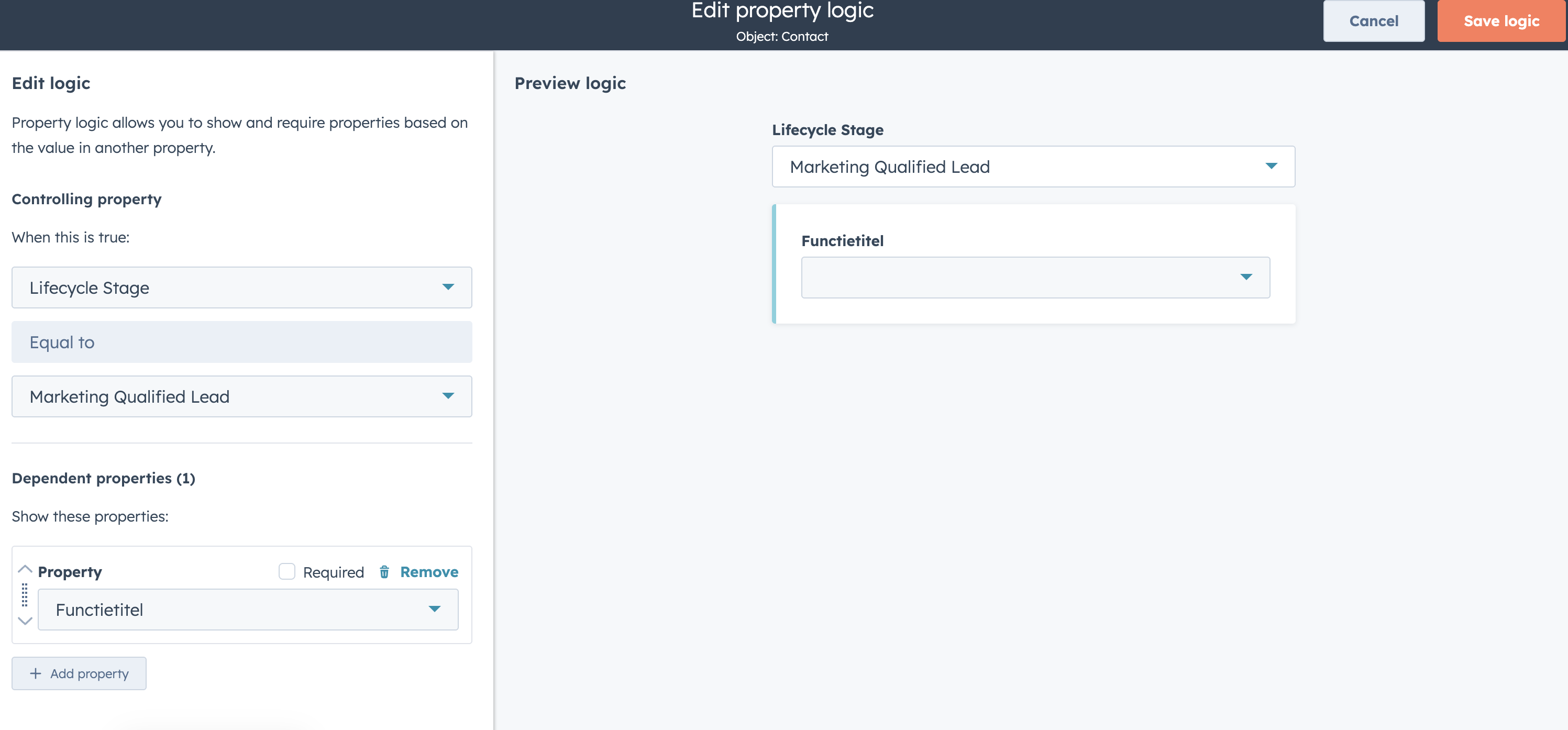
With Conditional Property Logic, you can now automatically show or require fields as soon as a contact reaches a specific lifecycle stage.
For example:
A lead downloads a whitepaper and automatically becomes an MQL.
Previously, sales only saw the basic details.
With Conditional Logic, you can now set it up so that when a lead becomes an MQL, filling in the job title becomes mandatory. Thanks to this better data, you can, for example, target only MQLs with a completed job title.
Who is it for?
Available for CRM & Marketing Hub Pro & Enterprise.
Improved Contact Enrichment coverage
Recognise this: you want to enrich a contact in HubSpot, but the match just isn't found. For example, because:
- too little information is available
- an email address isn't (properly) recognised
- the data deviates slightly from what HubSpot expects
The result: incomplete contact records, manual lookup work, and less reliable segmentation and automation.
What's new?
HubSpot has expanded contact enrichment coverage. By:
- smarter processing of existing data
- adding extra data sources
- improved matching
Who is it for?
All hubs and tiers
Sales & Deals: better experiences and fewer errors
Why does this matter?
When digitally signing a quote, everything hinges on trust and recognisability. When an e-signature verification is sent from a generic or unfamiliar HubSpot address, it can raise doubt with the recipient.
Result?
Delayed signing, extra questions directed at sales, or, in the worst case, an email that's simply ignored. Small friction, big impact on your closing speed.
What's new?
You can now set the sender address for e-signature verifications yourself.
That means the verification email is now sent from, for example:
sales@yourcompany.com
instead of a standard system address.
What this solves:
✔ Higher recognisability for the recipient
✔ Better deliverability
✔ Less confusion around verification emails
✔ A more professional and consistent brand experience
✔ Faster signing of quotes
A quote that's visibly sent from your organisation builds trust. And trust speeds up deals.
Who is it for?
Available for Sales Hub Professional & Enterprise.
Improved visibility and management of spam in forms
Why does this matter?
Spam submissions disrupt your data, pollute your CRM, and create unnecessary noise in reporting and workflows. Yet until now, it was hard to quickly see:
- Where exactly spam is coming in
- How serious it is
- Which submissions genuinely need action
Spam was scattered and hard to assess, which made cleaning up forms time consuming and confusing. With this update, you finally get central control and clarity.
What's new?
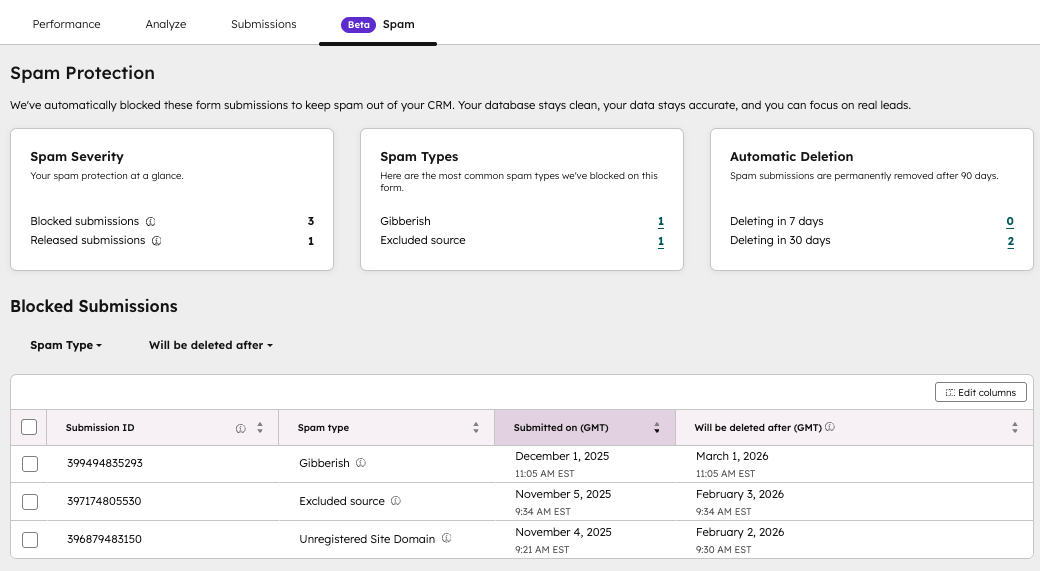
New 'Spam' tab per form
Each form now has a separate Spam tab with:
- Insight into spam severity
- An overview of the most common spam types
- Upcoming automatic deletions
- A filtered list of blocked submissions
- The ability to release or delete submissions individually or in bulk
All directly within the relevant form, with no extra searching.
Global spam overview
Via Marketing > Forms > Analyse, you get insight into spam submissions across all forms. Here you can filter, review, and take action directly.
Who is it for?
Available for all hubs and subscription tiers.
Customer Agent across multiple channels
What is it?
Businesses can now deploy the Customer Agent across multiple messaging channels, including SMS, Instagram, Telegram, LINE, WhatsApp, and Slack.
Alongside the standard HubSpot channels, you can also build your own channel integrations via the Custom Channels API. In addition, various apps are available in the HubSpot App Marketplace that add these channels to your Inbox or Help Desk directly, out of the box. More integrations are on the way too.
Why does this matter?
To genuinely offer omnichannel service, you need to be present on the channel where your customer is. Not every customer chooses email or live chat. Some prefer to communicate via WhatsApp, Instagram, or even niche channels.
Previously, you were limited to the channels HubSpot itself supported. With this expansion, organisations get more freedom to tailor their service experience to their audience's communication behaviour, without giving up central control and insight.
How does it work?
Go to Settings → Inbox & Help Desk → Channels.
Click 'Connect a channel' and select the new channel.
Follow the app's setup instructions.
Once installed, you can receive and send messages via the new channel just like any other HubSpot channel.
Assigning Customer Agent to a channel:
Go to Service → Customer Agent.
Open the Manage tab.
Click Deployment → Channels.
Choose 'Deploy agent' and select the desired inbox or help desk channel.
Note: deploying Customer Agent on a channel uses HubSpot Credits.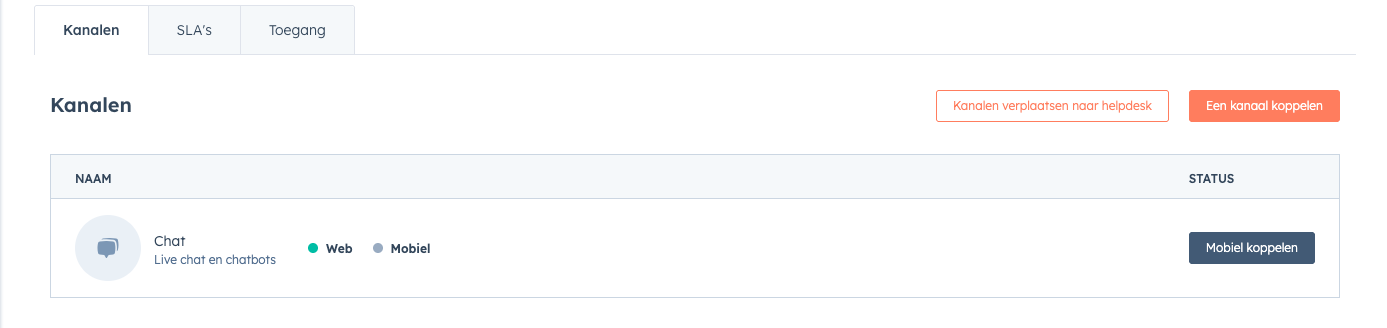
Who is it for?
-
HubSpot Credits
-
Professional & Enterprise Customer Platform
-
Sales Hub Professional & Enterprise
-
Service Hub Professional & Enterprise
Testing Customer Agent safely
What is it?
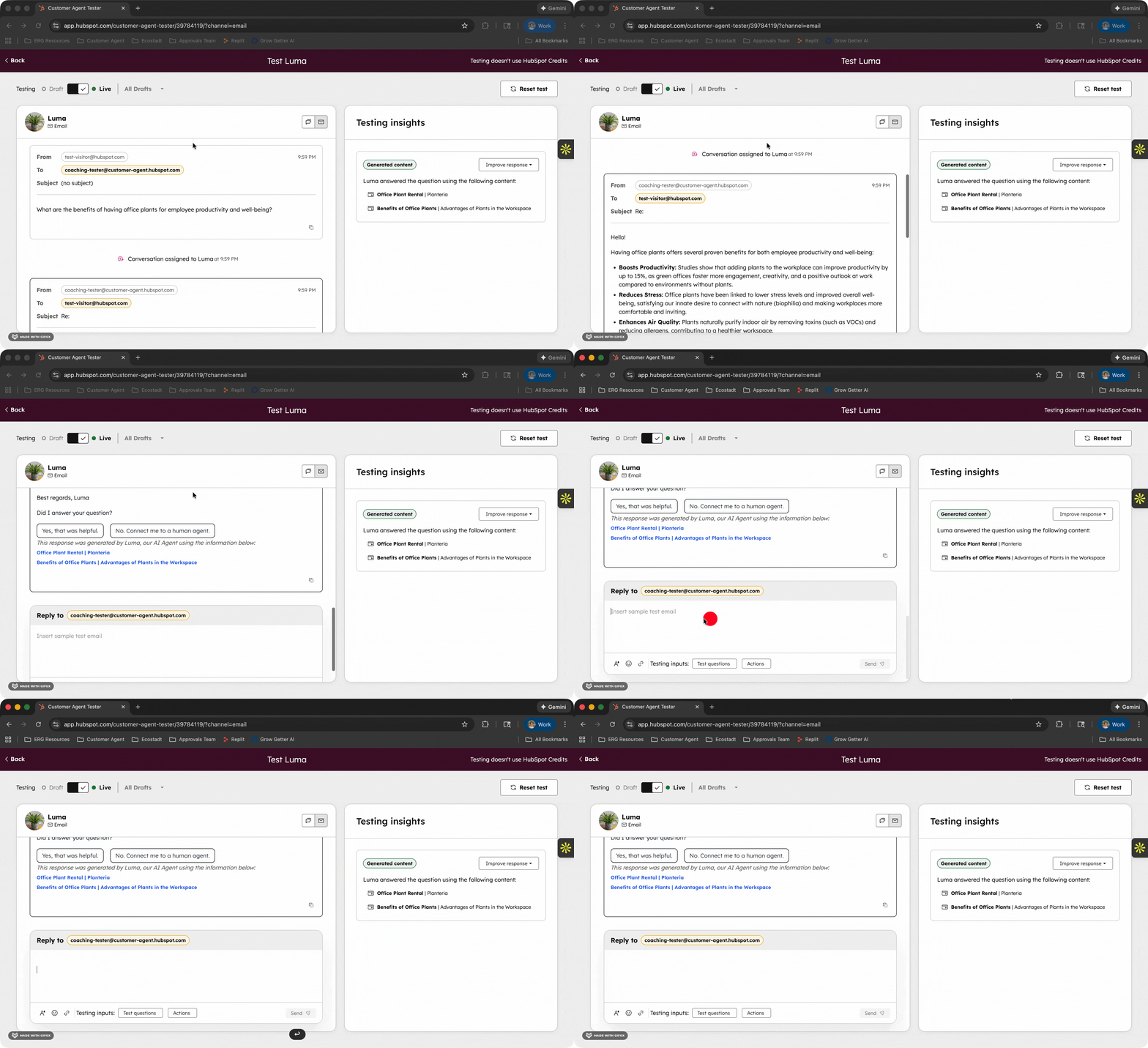
With email testing, you can see exactly how your Customer Agent responds to emails from customers. You can simulate full email conversations, from the first question to the final answer, exactly as they would appear in a real inbox.
Why does this matter?
Email requires a different approach than chat. Replies need to be complete, professional, and well structured. You can't adjust in real time the way you can in a chat conversation.
Previously, you had two options:
-
Put email live and hope for the best
-
Test in chat and estimate how that would translate to email
Now you can check in advance whether your agent gives clear, correct, and well-structured replies. Extra important, since emails are permanent and visible to the customer.
How does it work?
-
Go to your Customer Agent and click 'Test [agent name]' in the top right
-
Choose Email as the test channel
-
Select the live (current) version
-
Write a realistic customer question and send
Who is it for?
Available for organisations with HubSpot Credits and Professional or Enterprise licences within Customer Platform, Content Hub, Marketing Hub, Data Hub, Sales Hub, and Service Hub.
Selectively removing values from multi-select properties in workflows
What is it?
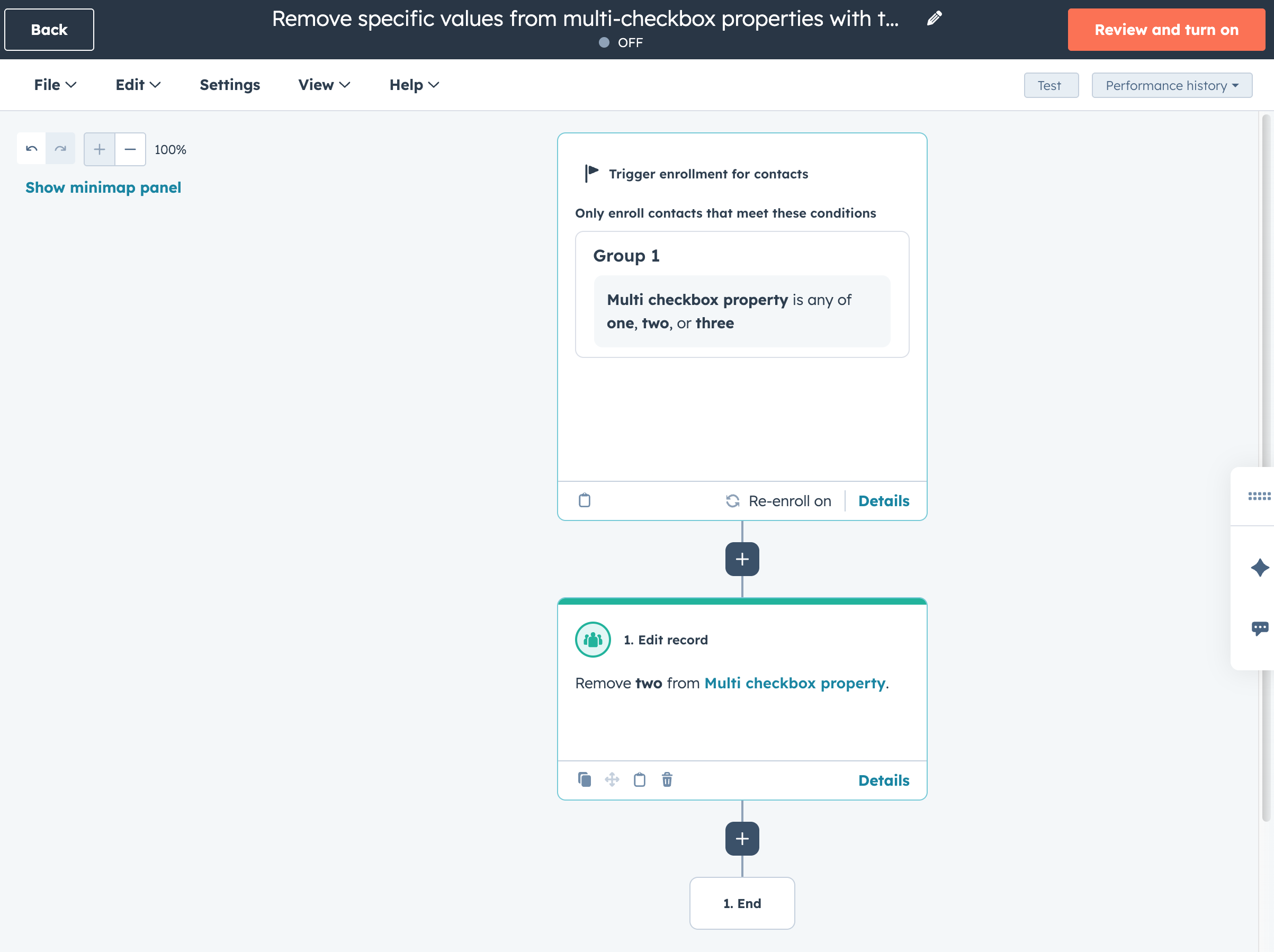
Within the Edit record workflow action, you can now remove specific values from a multi-select checkbox property without clearing the entire field.
Instead of clearing the whole list and rebuilding it, you can now remove specific selected options directly within your workflow.
Why does this matter?
The Edit record action is one of the most powerful workflow tools for managing CRM data at scale. You could already add, replace, or clear values, but selectively removing a few options was cumbersome.
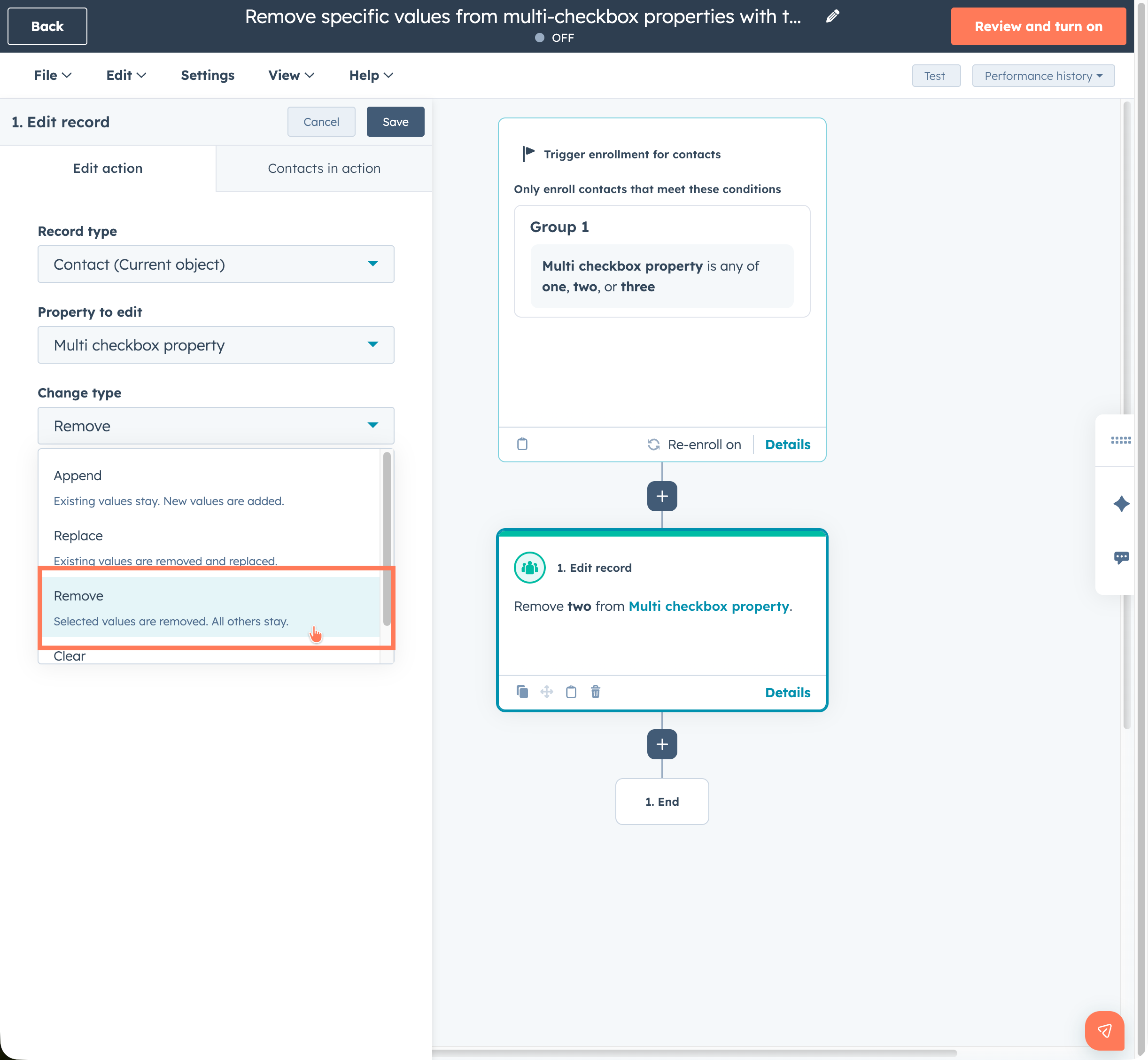
Previously, you had to:
-
Clear the entire field
-
Re-add the correct values using branching logic
-
That resulted in more complex workflows, extra maintenance, and a greater chance of errors.
With this update, workflows become simpler, clearer, and more reliable. You keep your CRM data accurate without unnecessary complexity.
How does it work?
-
Add the Edit record action to your workflow
-
Choose a multi-select checkbox property
-
Under Change type, select the Remove option
-
Choose the specific values you want to remove
-
Alongside removing, the options to add, replace, and clear remain available too.
To conclude
With these updates, HubSpot is once again strengthening its position as a central platform for commercial impact and data-driven work. From smarter workflow logic and cleaner CRM data to better AI applications and more grip on service channels: you get more control without processes becoming more complicated. Many improvements are available immediately and work automatically into your daily operations, meaning less manual work, fewer errors, and more insight into what genuinely contributes to growth. Curious which updates will have the most impact on your marketing, sales, or service team? We're happy to think strategically alongside you.
Want to know how HubSpot can help you?