New HubSpot product updates
The latest HubSpot updates are here.
HubSpot keeps innovating at a rapid pace, and this round brings a set of powerful improvements that deliver more overview, smarter automation and a smoother workflow. From enriching buying intent signals to improved variable search, more advanced ticket routing and stronger data security: every update contributes to faster, more efficient and more consistent working.
Whether you work in marketing, sales, service or operations: these improvements have a direct impact in daily practice. Below you will find the main highlights and what they concretely mean for your organisation.
Highlights
Automatically backfilling historical behaviour to better recognise buying intent

What is it?
From now on, HubSpot automatically backfills 30 days of historical signals as soon as you start following a company. Free of charge and instant, so you have a complete picture of the intent of every tracked account from day one.
Why does it matter?
You can now:
-
Act immediately: no more waiting. As soon as you follow a company, the signals from the past 30 days are automatically added to the timeline.
-
Feed workflows and segments straight away: the backfilled signals immediately count towards segmentation, workflows and lead scoring.
-
See the full picture: no more "0 signals" when you know there was activity.
How does it work?
As soon as you follow a company, whether manually or via a workflow, the historical signals are added automatically. At no extra cost.
Who is it for?
All HubSpot customers with HubSpot Credits.
Breeze assistant can now read HubSpot CRM data.
What is it?
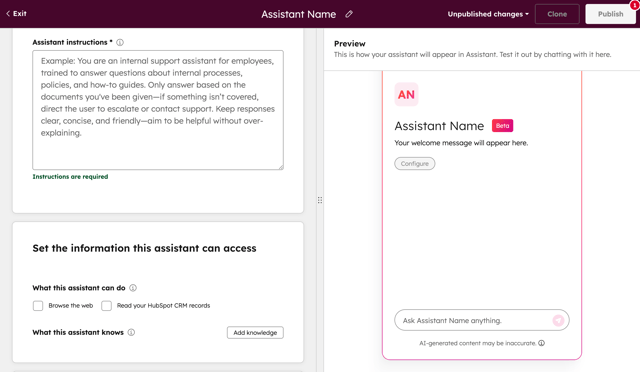
Your Breeze assistant can now read HubSpot CRM records, including custom objects and properties.
Why does it matter?
Thanks to this extension, your Breeze assistant can access more HubSpot data without you having to add it to a Knowledge Vault first. You can now use your Breeze assistant to:
-
Recommend discounts based on extensive deal information.
-
Help customer success managers identify critical pain points.
-
Provide insights on any record a user views in the portal.
How does it work?
To enable this feature:
Navigate to your Custom Assistant builder
Tick the box to allow the assistant to read your HubSpot CRM records
Recommended: specify in the Assistant instructions field which data the assistant should be able to access.
Who is it for?
HubSpot Starter and higher tiers.
Improved search for data variables
What is it?
When you search for a data variable, you now see all possible matches across all your data sources.
Why does it matter?
Data variables are essential for personalised workflows, but searching for them often took a lot of time. That is why we added one powerful, unified search function that lets you find any variable in seconds, across all your sources. This makes it easier than ever to build accurate, personalised workflows.
How does it work?
Add an action that supports variables, such as "Send internal email notification". While composing the email, open the data panel and simply type a search term, and you will immediately see relevant matches from all your data sources.
Who is it for?
Available for all Professional and Enterprise editions of Customer Platform, Smart CRM, Marketing (including Marketing+), Sales, Service and Ops.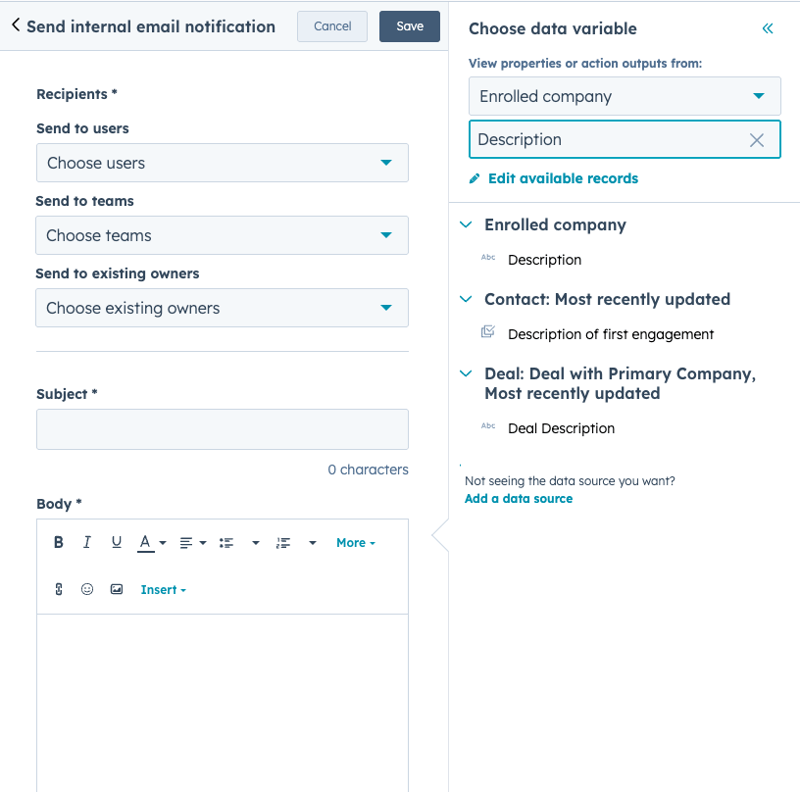
Ticket assignment based on availability and fair distribution
What is it?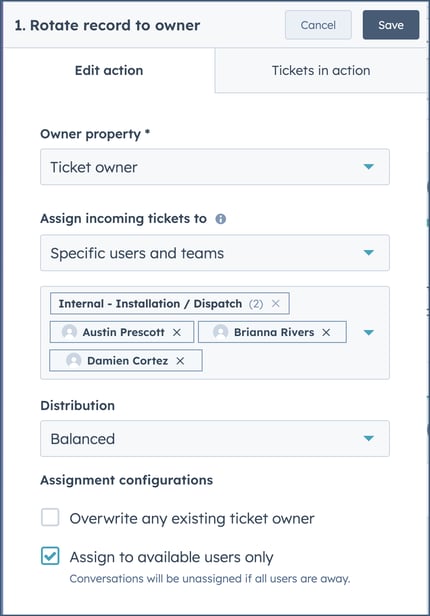
The "Rotate owner" action in ticket workflows has been renewed. You can now select individual users and teams, assign based on availability and working hours, take capacity into account (SvH ENT) and distribute tickets via round-robin, balanced or random, including fallback to the customer agent or contact owner.
Differences between "Rotate owner" and Helpdesk routing meant tickets were assigned inconsistently, resulting in longer resolution times and an uneven workload distribution. Bringing "Rotate owner" in line with Helpdesk capabilities now creates one consistent and reliable way of ticket routing in HubSpot.
What does this mean for you?
All existing rotation actions in ticket workflows are automatically converted to the Helpdesk routing engine, including the new options. Your previous user and team selections carry over cleanly, as do your owner override settings. You do not need to do anything.
Who is it for?
Service Pro, Service Enterprise
One set of permissions for all objects: contacts, companies, deals, tickets and custom objects
What is it?
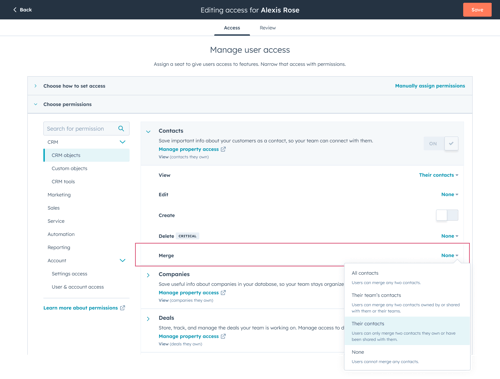
With a new permission for Contacts, Companies, Deals, Tickets and Custom objects, admins can determine whether a user can merge each specific object type, independent of their permission to edit that object.
Why does it matter?
Currently, any user with edit rights for an object can also merge records, which raises concerns about data hygiene. Customers have to allow editing to enable the work, but in doing so unintentionally also grant merge rights.
How does it work?
Admins can set in "Users & Teams" what access level someone gets for merging contacts, companies, deals, tickets and custom objects. There they determine whether a user may merge all records, only their own records, team records or no records at all. By default, every user gets the same merge rights as their existing edit rights.
Who is it for?
Available for all hubs and tiers.
Helpdesk: coloured status for escalated tickets from service agents
What is it?
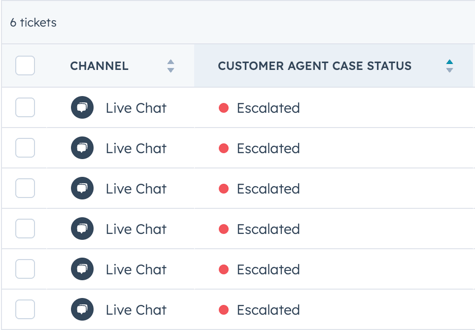
Coloured status indicators have been added for escalated Customer Agent tickets. This means escalated tickets now get a clear red colour, so they are easy to spot at a glance.
Why does it matter?
Coloured statuses help service agents quickly recognise and prioritise escalated tickets. This improves response times, visibility and handovers from the Customer Agent to human representatives.
How does it work?
This update is applied automatically to the Customer Agent Ticket status property for all escalated Customer Agent tickets, no configuration required.
Who is it for?
All hubs and tiers.
Updated CRM association cards
What is it?
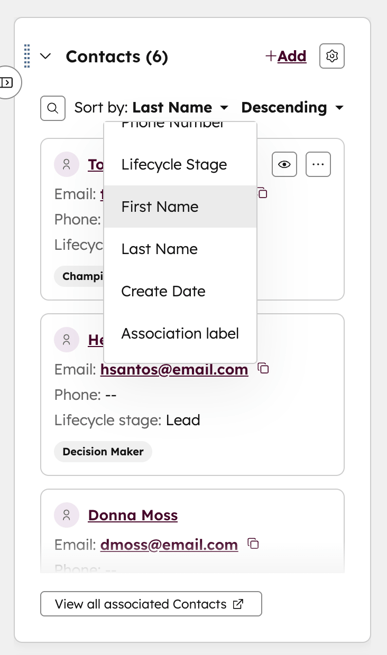
Association cards now support sorting, searching, extra display properties and inline scrolling. This helps you find and organise associated records faster and see key details at a glance.
Why does it matter?
You now have more control, visibility and flexibility when navigating CRM records and relationships. These upgrades streamline workflows while keeping record context easily accessible.
How does it work?
- Search and sort within associations using the new search bar.
- Use flexible sorting options to order by any displayed property, including association labels.
- Set your preferred sort order and save it.
- Display up to five secondary properties per record.
Who is it for?
Available for all hubs and tiers.
To conclude
With these updates, HubSpot takes a solid step towards a platform that responds faster, collaborates better and provides more context exactly when you need it. Whether you want to enrich signals, improve workflows, distribute tickets fairly or manage data more cleanly, every change contributes to a smoother and more productive working environment. Best of all: many of these improvements work fully automatically, so you can focus on the work that really makes an impact. Want to know more about a specific part? Get in touch.