Lead Scoring with HubSpot: How Do You Use It Optimally and Correctly?
 Carel Schrier
Lead Scoring with HubSpot: How Do You Use It Optimally?
Lead scoring can help you rank your leads based on their interactions and the value associated with them. As a result, leads with more interactions are presented to your sales team before leads with fewer interactions. Logically, the sales opportunity is higher, making it a qualitative lead worth following up on. HubSpot offers both predictive and manual lead scoring models that help you optimise your lead management processes.
What Is Lead Scoring?
Lead scoring is the process of assigning values based on interactions. Think of website behaviour, email engagement and other relevant touch points. In essence, you rank your leads based on their suitability and importance to your organisation. Not all leads are equally interesting, so it helps your sales or marketing teams to focus their energy and time on the right leads.
How Exactly Does Lead Scoring Work?
Imagine a potential customer visits your website and views a specific landing page for the fourth time in a short period. By assigning scores to visits to this landing page, this lead moves higher in your lead ranking. Naturally, this also works the other way round when someone does not meet certain criteria. Think of a negative score when a company does not meet a revenue threshold of 5 million or has fewer than 10 employees.
What Are the Benefits of Lead Scoring?
As a company, you want to use your valuable time as efficiently as possible. That is why it is important to adopt lead scoring within your organisation. It delivers the following benefits:
1. Work effectively
When a company chases every lead, it regularly wastes time. Because the HubSpot CRM combined with lead scoring tells you exactly which pages have been viewed and which content has been read or downloaded, you can respond with the right content. This allows you to engage the most qualitative leads at exactly the right moment.
2. Strengthen the dynamic between sales and marketing
When you break down the silos between sales and marketing and seek closer collaboration, it will impact your revenue figures. Research from Northern Illinois University shows that when you align your departments more closely, companies achieve YoY (year-on-year) growth 12% more often. Make sure you build a lead scoring model together with your sales and marketing departments, so you establish harmony from the start.
3. Save costs with lead scoring
By focusing your efforts on qualitative leads, you can not only increase revenue but also reduce costs. You can identify pain points more quickly, allowing you to respond at the right moment and thereby increase conversion.
4. Engage at the right moment
When someone visits a specific page, that can be a factor counting towards lead scoring. This gives your sales team good insight into what the prospect is highly interested in. They can use this in sales conversations to base their story on. This allows you to tailor the conversation to the wishes and needs of your potential customers.
What Lead Scoring Models Are There?
There are two flavours when it comes to lead scoring models. On the one hand, you have predictive lead scoring and manual lead scoring. We will explain the difference.
1. Predictive Lead Scoring
Predictive lead scoring uses machine learning to analyse hundreds of data points to build the score for your prospects. It uses historical data from your customers and prospects to determine which data points influenced conversion. This option is only available within the Marketing Hub and Sales Hub Enterprise packages.
2. Manual Lead Scoring
As the name suggests, manual lead scoring is a lead scoring model based on your own input. You need insights from marketing and sales to determine which data points are most interesting. From there, you assign scores to these data points to set up your own lead scoring model.
Which Data Points Can Be Used for Lead Scoring?
There are a huge number of options for building your lead scoring model. What exactly are the data points and what should you consider? We have listed them with various examples.
1. Demographic
Demographic data includes location, income, education, job title or age, for example. Imagine your ideal audience is sales managers, then you can assign points for that job title. If someone enters a different job title, you can assign negative points there.
2. Company information
Company information is hugely important, especially for B2B companies. Think of company size, revenue and industry, for example. When you focus on specific industries, you can assign points there, and for industries that are not directly relevant, you can assign negative points.
3. Website behaviour
A visitor’s website behaviour can be a very good indicator of how interesting a lead is. You can assign points for how long they spend on your website, how often they visit your website, and also for visiting specific pages. By assigning points to these options, or negative points if someone has not visited your website for a while, you get a good ranking.
4. Email interaction
HubSpot gives you a huge amount of insight when it comes to emails, but the most interesting points are still opens and clicks. By assigning points to opens and clicks, and negative points to people who do not open, you gain control over this.
5. No qualitative data
When someone does not fill in certain fields, or when you do not yet have a complete picture of your prospect, you can assign negative points here. This means you first need more information before actually starting a conversation with the prospect.
How Do You Set This Up Within HubSpot?
Once you have held sessions with sales and marketing and know your relevant data points, it is time to assign scores. This can be done in several ways, the most common being a scale of 0 to 100 points. You then divide this scale based on prospect, lead, MQL and SQL.
Have you got that all sorted? Then you can start implementing it within HubSpot. Go to your Settings and then to your Properties. There, under Contact Properties, you will find the ‘HubSpot Score’ property. There you can set up your lead scoring model within the ‘Positive Attributes’ and ‘Negative Attributes’, in other words, the positive and negative points count.
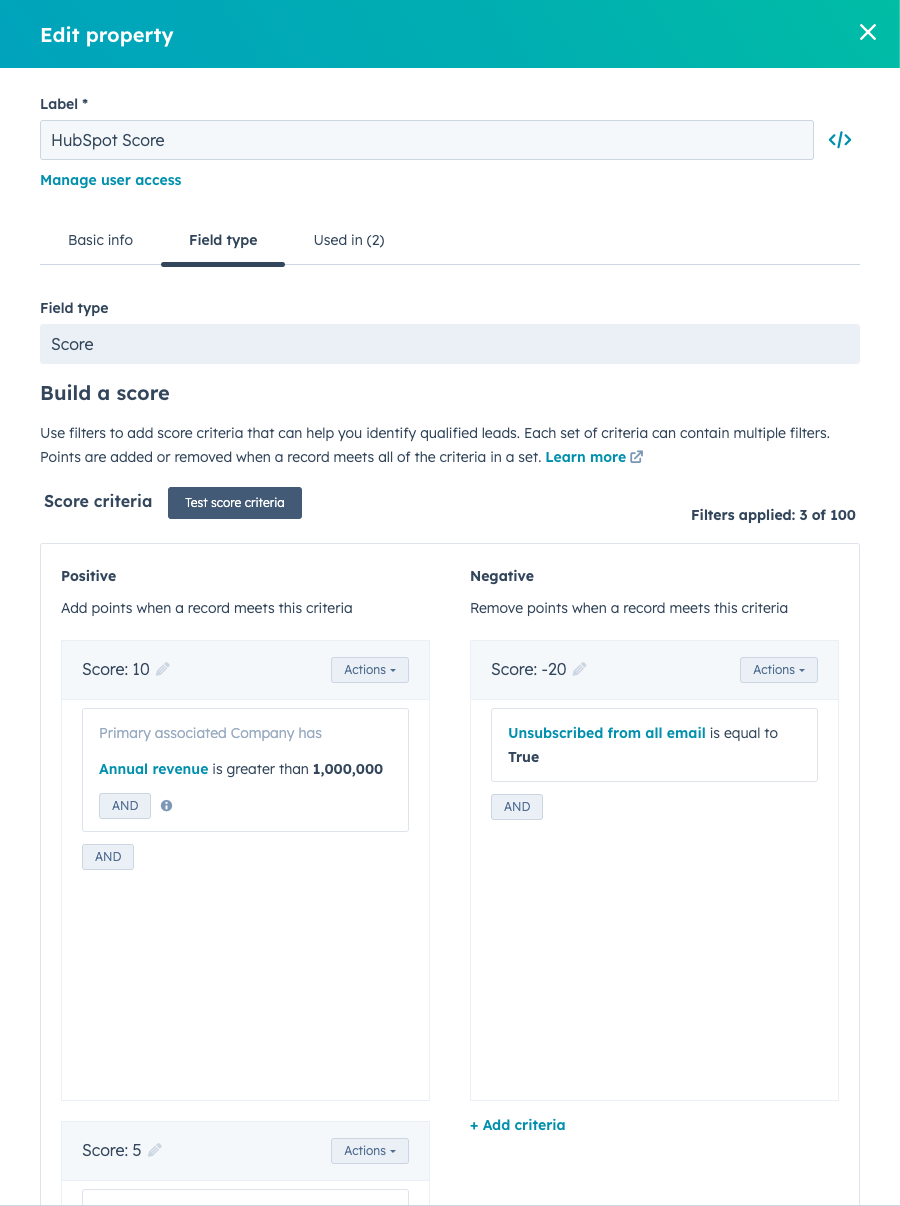
Naturally, under Contact Properties, provided you have Enterprise, you can also find the predictive lead scoring property. This is called ‘Likelihood to close’ and is filled in automatically.

Tips for Your Lead Scoring Model
We would like to share a few more tips, because getting started with lead scoring can be a challenge. Use information from your marketing and sales teams. Do not make it too difficult for yourself at the start.
Do not use only positive or only negative points. Keep continuously optimising, expanding and use our lead scoring template. This will definitely help you analyse your lead scoring.
Get Started with Lead Scoring
The lead scoring options within HubSpot can add enormous value for any organisation, provided you set it up correctly or make use of predictive lead scoring. It ensures refined alignment between sales and marketing and prioritises prospects who are ready to convert. Need help setting up a lead scoring model? Feel free to schedule a call.