HubSpot versus MailChimp
 Carel Schrier
Marketing professionals have an enormous number of tasks today. Think of setting up advertising campaigns, managing social media accounts, and creating and sending email newsletters. In short, there is plenty for a marketer to do! Alongside the sheer number of tasks, there is also a huge number of tools available to accomplish them. In this blog post, we explain the difference between MailChimp and HubSpot.

What is HubSpot?
You are probably already familiar with HubSpot , but we're happy to briefly explain what the platform involves. HubSpot is a growth platform that combines marketing automation, email and other marketing tools with the power of a CRM system (Customer Relationship Management system). It gives you transparent insight into how your marketing efforts affect the customer experience throughout their buyer's journey. HubSpot is rated by Capterra as one of the best Marketing Automation software solutions.
What is MailChimp?
MailChimp is a marketing automation and email marketing tool founded in 2001. MailChimp customers use the email tools it provides to connect with their target audiences, extending this through various integrations such as WordPress, ZenDesk, Google Analytics, LinkedIn or Calendly, among others.
Creating and sending emails that generate engagement
An email service provider, or ESP, is a tool that marketers usually add to their toolkit right away. Email is a fast and easy way to engage your leads and nurture them into becoming loyal customers of your business. On top of that, it's also enormously cost efficient, as research from Business 2 Community shows that the potential ROI of email is 4400%. That said, don't rush into choosing the first email service provider you come across. Think it through carefully first. What are the future prospects of the tool? It's worth choosing a system that's flexible enough to keep up with your growing business over the coming years.
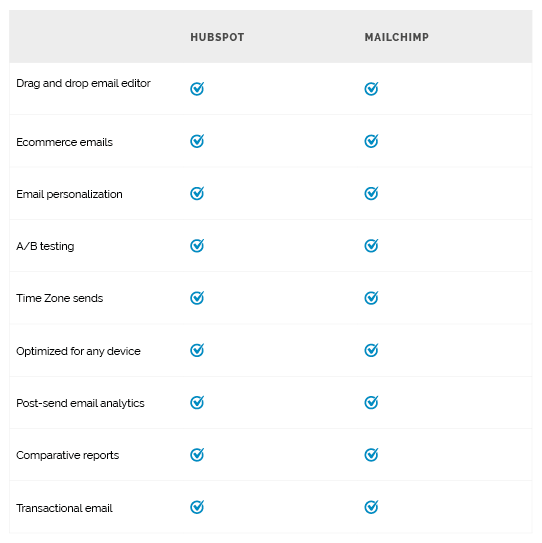
When you build an email within MailChimp, you can do so with a simple drag and drop editor, or you can opt for custom coded email templates. If you choose the paid version of MailChimp, you also get options such as A/B testing and dynamic send times. Within your reports, you also get options to analyse data across various campaigns and share it with your team members.
When we look at building an email within HubSpot, it actually offers everything MailChimp has to offer, and more! HubSpot also uses a drag and drop editor, and there are various templates available that can be personalised as needed so they match your branding. As your business grows and you choose a different package, you gain smart send times, A/B testing and more in return.
The real strength of HubSpot doesn't lie so much in the email system itself. That may sound strange, but HubSpot's strength lies in the combination of email, CRM and marketing automation. With HubSpot, you can create email campaigns that are fully personalised based on the data you've collected within the CRM. You can then apply simple if/then logic to this using automation. As a result, every contact gets an email experience tailored to what they do with your email and the experience they have with your business.
Managing contacts
As your business grows, your database of contacts will grow too. For your company's growth, it's essential to be able to measure the interaction between these contacts and your business. By using a marketing automation platform, you gain more insight into the customer journey of all your (potential) customers. This gives you control to personalise your marketing further and, in turn, grow your business further.
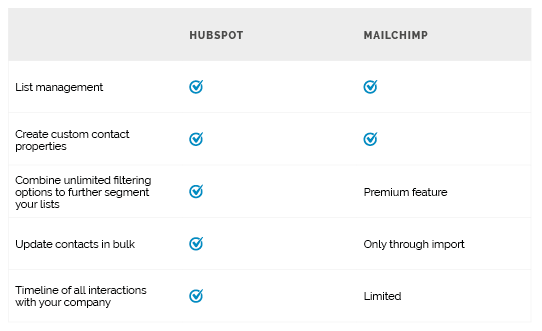
MailChimp has a Marketing CRM where you can store your target audiences. Using segments and tags, you can send emails to these groups. A segment automatically creates a group of contacts based on one unique variable. Using tags means you can, simply put, create groups manually. With the free version of MailChimp, segments give you the option to use a maximum of 5 variables. If you choose the paid version, you can use advanced segmentation options, allowing you to create unlimited combinations of variables to filter your target audience.
HubSpot is directly integrated with one of the best CRM systems for growing businesses. It gives you insight into the complete experience a customer has with your business. It goes further than just information about your marketing activities. Of course, you can see when a contact has opened your marketing email, but you can also see which pages that person has visited on your website. You can also find recent sales conversations and whether they may have opened a support ticket. You can supplement this with all kinds of custom properties, so that all the important data for your business can be found in the CRM. This data can then be used or combined again for your marketing activities, from the free marketing tools right up to Enterprise packages.
How does marketing automation work?
Marketing automation is the automation of various marketing actions based on how a customer interacts with your business. It's an essential part for companies that want to scale up. As you grow, it becomes increasingly intensive to carry out certain actions manually. Eventually, you simply have too many contacts in your CRM, which takes too much time. Marketing automation creates efficiency, allowing you to focus on creating personalised experiences.
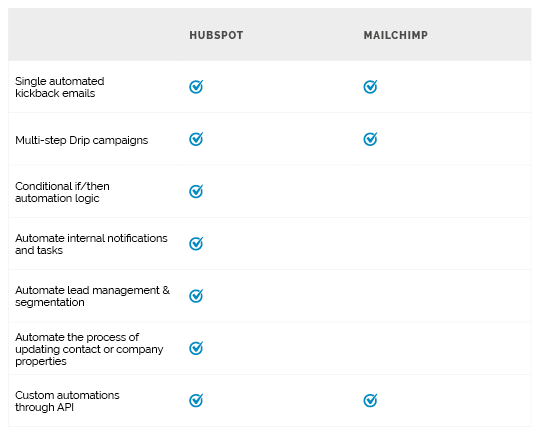
MailChimp has marketing automation that can follow up with marketing emails based on various actions by your contacts. For example, it supports so called abandoned cart emails and birthday emails, among others. However, MailChimp's marketing automation only lets you apply marketing automation in the area of email marketing. You cannot apply automations in areas such as contact management or internal notifications. As a result, you're dependent on other tools to handle these matters.
Where MailChimp's marketing automation options stop, that's exactly where HubSpot's begin. HubSpot's marketing automation options go beyond just follow up marketing emails. The automations are practically endless, and can include contact management, distributing leads within your sales team, or even automating support tickets. Within these automations, you can go a step further by adding delays and applying conditional logic. Think of a follow up email that's only sent 2 days after the last interaction, or when certain conditions have been met. This gives you complete control over the automations for your business that aren't just focused on email marketing.
Social media and advertising options
Managing active social media channels is essential to engage in conversation with your target audience. Adding advertising on top of this via social media and Google Search lets you send messages to targeted audiences. You can use ads to gather new leads, target your messaging, or re-target your contacts in order to nurture them.
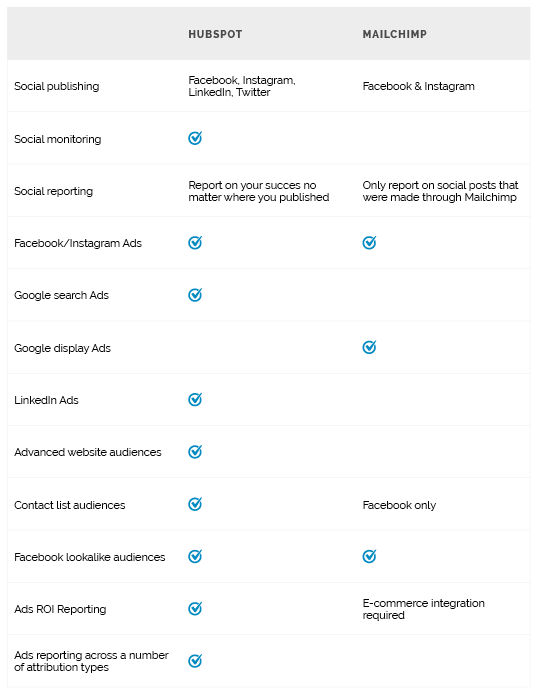
With the social media tools MailChimp offers, you can post messages to the Facebook and Instagram timeline. Within the advertising tool, you can manage your Facebook Ads and Google Display Ads. There are also a number of reports available here, where you can view ad spend and revenue. For Facebook, you do need an e-commerce platform connected, such as Shopify or WooCommerce. Once you have this connection, the targeting options in MailChimp are, however, limited. For example, you cannot use contact lists within Google Ads to exclude certain contacts. You can therefore only target ads at all your website visitors, and there's no option to specify particular pages or groupings of pages.
If you're looking for a tool to get your entire team aligned on your organic social media and paid strategy, then HubSpot is the tool for you. With it, you have the option to connect Facebook, Instagram, LinkedIn and Twitter, allowing you to post content on each of these networks via the platform. You also get direct insight into all possible reports, so you can immediately see how successful you are on any of these channels. It also doesn't matter how you post the content; content posted via HubSpot as well as content posted directly on the social media platform will both show up within HubSpot. It's also possible to connect YouTube to see how your target audience responds to your video content. To then monitor trends or specific search terms within social media, you can use the social media monitoring tool. The search terms or trends that matter for your business are immediately visible, and you can respond directly to these posts within HubSpot.
If we then look at the advertising tool, it's possible to manage Facebook, Instagram, Google and LinkedIn campaigns from one central location. Once these accounts are connected within HubSpot, adding tracking pixels is arranged in no time. You don't need a developer for that! When you receive a lead via Facebook or LinkedIn lead campaigns, it's synced within HubSpot immediately. The targeting options you can then apply are extremely extensive. With the data in your CRM, you can be extremely specific, for example by creating a target audience of people who have viewed a number of specific pages. Because the advertising is also connected to your CRM system, you can report exactly on the revenue that can be attributed to the ads across the different stages of the buyer's journey.
Building landing pages and forms
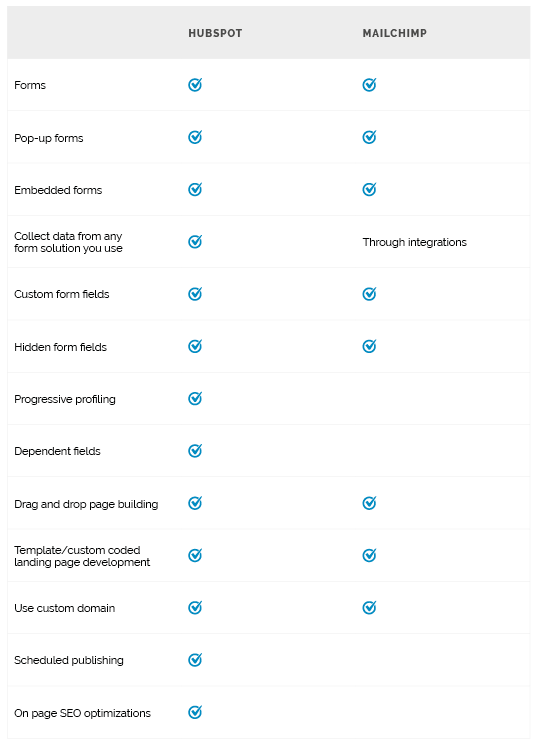
Building simple and effective landing pages that match your brand or business is essential for growth. An effective landing page should make it simple for visitors to quickly enter their details in order to get the information they want. Your forms need to be adjustable to meet the needs of your business, but also aimed at the needs of the potential customer. This lets you gather the information you need in order to nurture your leads.
Within MailChimp, you have the option to create landing pages and forms using drag and drop. The form is automatically linked to a list. This makes follow ups quick and simple to carry out.
HubSpot also has a robust solution for landing pages and forms. What sets it apart from MailChimp is the flexibility of the tool. By adding the HubSpot tracking code to your website, you automatically get data within HubSpot from the completed forms. On top of that, HubSpot understands that not every form is meant to convert a lead. So called progressive profiling lets you control what a visitor sees on your website and whether that visitor already exists within your database. Based on this, you can adjust certain things, and the form can change in terms of the information it asks for.
Language options
As your business grows, your team will grow too. It may even grow to the point that your marketing team works in offices all over the world. It may even be the case that English isn't the native language of some employees or regions where your business is established. Whatever the challenge, your marketing strategy needs to be available in every language you think you'll need in order to execute it perfectly.
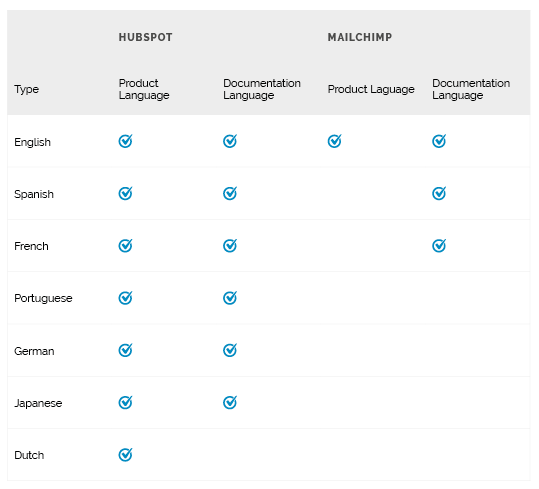
MailChimp has documentation available in various languages. However, the tool itself is only available in English.
Looking at HubSpot, this tool has both the product and documentation available in various languages. This means the tool can support your growing business across a range of languages.
Growing with HubSpot
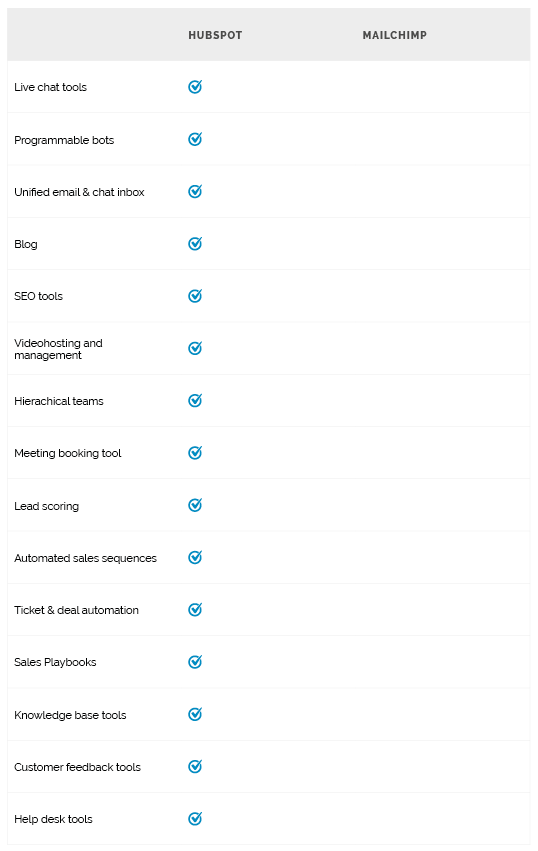
HubSpot is much more than just an email and marketing automation tool. With options such as live chat, CMS, SEO tools and many more options, HubSpot is a tool that aligns with your marketing strategy. And with the advanced options it offers, it gives you room to keep growing within the system as your business's needs grow. If you add your sales and service teams alongside your marketing team, these teams can work closely together without causing any friction in the customer experience.
Schedule a meeting with us below and find out what we can do for your business!